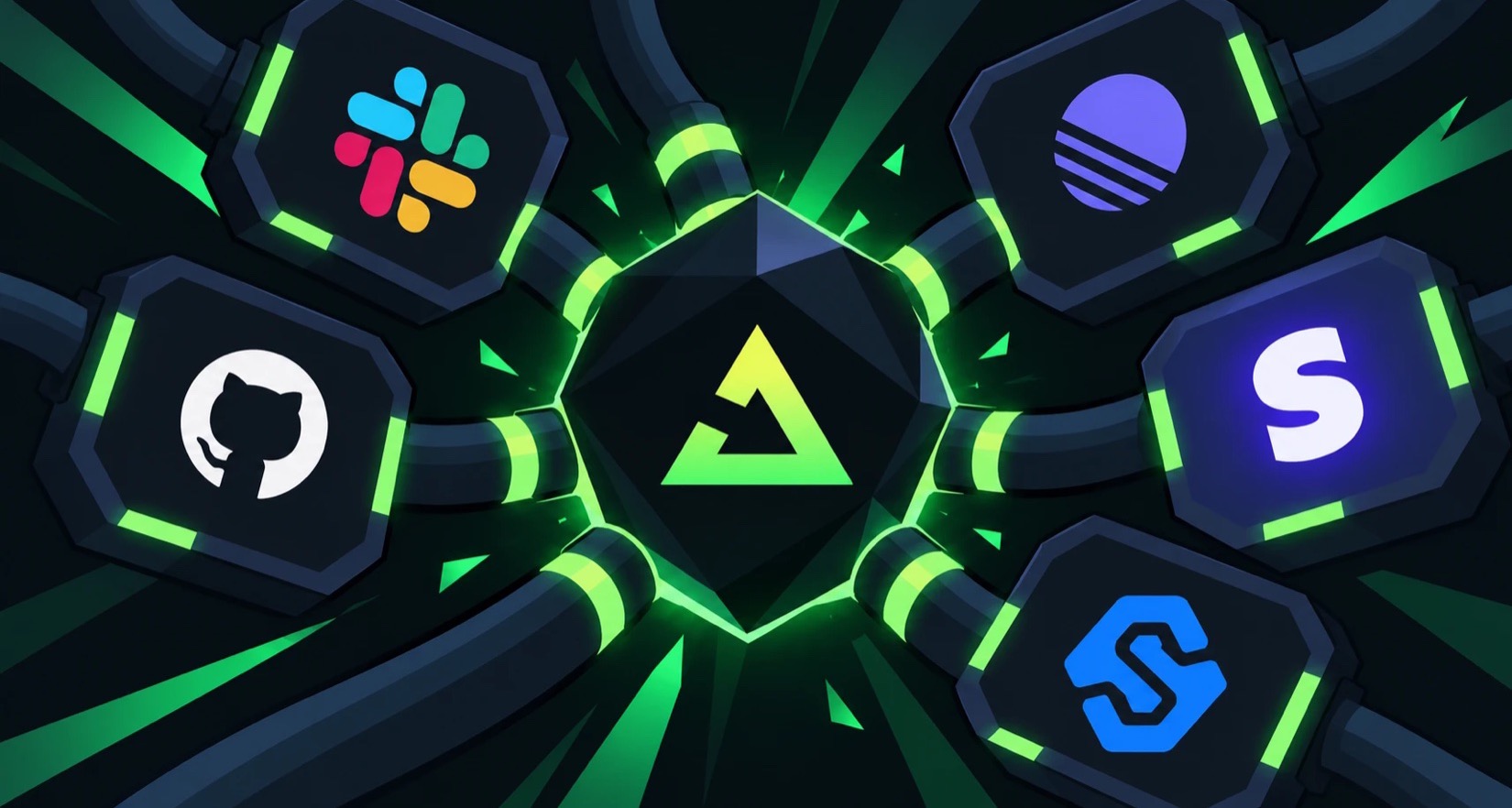
This week we launched webhooks in Trigger.dev.
We used to have webhooks, but we dropped them when we rebuilt Trigger.dev around durable execution. We wanted to get one thing right first: durable compute, where a run survives crashes, deploys and retries.
Then webhooks became our number 1 most requested feature.
So we rebuilt them from scratch, and this time everything that happens before a run starts had to be as durable as the run itself.
In this post, I'll set some context of our requirements and what we shipped.
Then I'll cover some design choices we made on the product side and some technical choices we made on our infrastructure.
Our requirements for webhooks
Trigger.dev is a platform for durable execution of AI agents. You write tasks, functions we run for you, and each execution of one is a run, with its own retries, logs and dashboard page. Our users need webhooks to trigger agents or workflows when an event happens. For instance a Stripe payment or a Slack message.
Our requirements were:
- Durable. Webhooks should be as durable as the rest of our platform. Once we accept a delivery, it can't be lost to a crash, a deploy or a database outage, and a provider's retries can't start the same run twice.
- Observable. Every delivery, and every run it starts, gets retries, logs and a dashboard page, so you can see exactly what happened.
- Low maintenance. We wanted to support dozens of providers without handcrafting an integration for each one and taking on the maintenance burden that comes with it. Adding a provider should mostly be configuration.
What we built
You declare a webhook endpoint in code, next to your tasks, and we host its URL, the one you give the provider, one per environment:
import { webhook, webhooks } from "@trigger.dev/sdk";export const stripe = webhooks.endpoint.define({ id: "stripe", source: webhooks.stripe(),});export const fulfillOrder = webhook({ id: "fulfill-order", endpoint: stripe, filter: "event.type == 'checkout.session.completed' && event.data.object.payment_status == 'paid'", onEvent: async ({ event }) => { console.log("Fulfilling", event.data.object.id); },});
When a provider's request reaches us, we verify it, deduplicate it and store it, and only then answer the provider. After that, it starts a run, wakes one that's waiting, or lands in an agent's conversation.
An endpoint can have three kinds of subscriber, and one delivery can reach all of them:
- Tasks, like
fulfillOrderabove: one run per delivery that passes its filter. - Waiters: a run that's already going pauses until a matching webhook arrives, like the payment for the order it's processing.
- Agents: the delivery goes to an AI agent as a new message in an ongoing conversation. For example, every message in a Slack thread goes to the same agent session, so the agent remembers the whole thread.
Every endpoint also gets signature verification for 46 named providers, dedupe on the provider's event ID, a page for every delivery with replay, and its own URL in local dev, with no tunnel.
How we verify webhooks
A webhook URL is public, so anyone can send a request to it. Verification is how you know a request really came from the provider: the provider signs each request, usually with a secret you share with it, and you check that signature before trusting the payload.
Every provider signs its webhooks differently, with its own header, algorithm and signed string, and getting it wrong means rejecting real webhooks or accepting forged ones. Some providers can't be checked with settings at all, only with your own code.
To meet our low maintenance requirement, we couldn't write and maintain verification code for every one of dozens of providers.
We surveyed 54 providers to see how they actually secure webhooks, and the differences were shallow. 63% sign with an HMAC, 20% send a shared secret in a header, 4% put a secret in the URL, and 13% do something else. Three kinds of configuration cover about 85 to 90% of the providers people ask for.
So the first release has no provider verification code on our servers at all. Verification is data, which also means nothing in the request path can hang or crash because of one provider's quirk. Here's the bundled Stripe source:
export function stripeVerifierConfig(opts?: { toleranceSeconds?: number }): WebhookHmacConfig { return { scheme: "hmac", algorithm: "sha256", encoding: "hex", signatureHeader: "stripe-signature", signature: { itemSeparator: ",", fieldSeparator: "=", field: "v1" }, timestamp: { source: { from: "signatureField", field: "t" }, toleranceSeconds: opts?.toleranceSeconds ?? 300, }, signingString: { template: "{timestamp}.{body}" }, idempotencyField: { from: "body", name: "id" }, };}
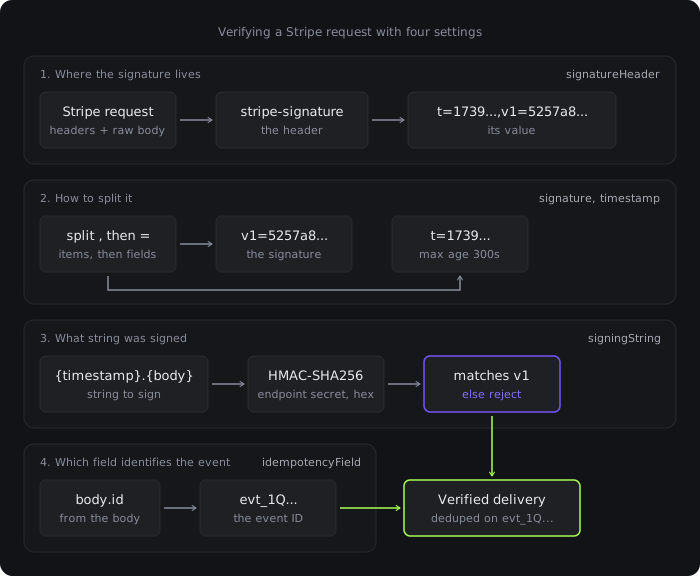
Stripe puts a timestamp and a signature in one comma-separated header and signs timestamp.body. GitHub signs the raw body. Standard Webhooks sends a space-separated list of signatures so you can rotate keys.
Each of those is the same four settings with different values: where the signature lives, how to split it, what string was signed, and which field identifies the event.
The SDK ships 46 named sources, including Stripe, GitHub, Shopify and Linear. Plus, Svix and Standard Webhooks are signing schemes shared by a long list of providers: Clerk and Resend use Svix, and OpenAI and Replicate use Standard Webhooks. And hookdeck() verifies anything relayed through Hookdeck, whatever sent it originally.
For the other 10 to 15% of providers, we need to let users execute custom code. That's not in this release yet (more at the end of the article).
Product design choices
Tasks are the core primitive at Trigger.dev. We decided to reuse that primitive rather than inventing something new. That way, not only would it be easier to reason with for our users, it would give them all the tried and tested functionality like observability out of the box, which covers our observable requirement.
Webhooks are tasks, declared in code
A webhook is just a task with an endpoint attached.
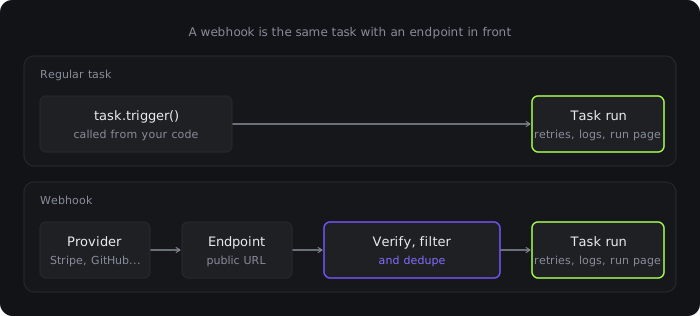
Endpoints are declared in code, so they're created from code too. When you run trigger dev or trigger deploy, the CLI sends the server the list of endpoints it found next to your tasks, and the server syncs the environment to match: it creates the new ones and deactivates the ones you've removed, keeping their URL and secret so re-adding one brings it straight back. There's no "create webhook" call to forget.
A few more choices follow from the endpoint living next to your code:
- Your route handler goes away. The provider sends to the endpoint's URL, and we verify the request and start the runs.
- No tunnel for local dev. Your dev environment has its own URL on
webhooks.trigger.dev, and a delivery that arrives whiletrigger devisn't running waits for it like any other dev run.
Type-checking filter strings
A Stripe account sends dozens of event types, and GitHub sends every push, comment and label change. If every delivery started a run, most webhook tasks would spend their lives discovering they had nothing to do, and you'd pay for each one.

So filters run as soon as a webhook arrives, before we start any runs, and each one takes about 0.3µs. If no filter matches, the delivery is recorded as FILTERED and nothing runs. We only charge for runs, not webhooks, so a filtered delivery is free.
Waiters use filters too. Thousands of runs can wait on the same endpoint, and the filter decides which one a delivery wakes up.
Filters are type-checked, so a typo in a filter is a compile error, not a filter that silently never matches.
Every endpoint already has an event type. Stripe and GitHub sources come with one, and you can pass a more precise one, like Stripe.Event from Stripe's own package. We check the filter string against that type at compile time, using the same trick ArkType uses for its type definitions. TypeScript's template literal types can match a string against a pattern and pull out the pieces. So the type system can split event.type == 'checkout.session.completed' into a path, an operator and a value, look up event.type in the event type, and check that the value is one it can hold.
In this example, the filter says 'checkout.session.complete' instead of 'checkout.session.completed', so your editor flags it before you deploy:
import type Stripe from "stripe";import { webhook, webhooks } from "@trigger.dev/sdk";export const stripe = webhooks.endpoint.define({ id: "stripe", source: webhooks.stripe<Stripe.Event>(),});export const fulfillOrder = webhook({ id: "fulfill-order", endpoint: stripe, filter: "event.type == 'checkout.session.complete'", // ✖ value 'checkout.session.complete' is not valid for event.type onEvent: async ({ event }) => { console.log("Fulfilling", event.id); },});
A filter that passes also narrows the event: with event.type == 'checkout.session.completed', event.data.object inside onEvent is a Stripe.Checkout.Session.
TypeScript limits how deeply types can recurse. Our first parser went one level deeper for every clause, so a valid filter with 13 clauses hit the limit and showed an error. We rewrote it to be tail-recursive, where each step hands off to the next instead of nesting inside it. TypeScript handles that pattern specially, and filters now type-check well past the 50 clauses the server allows.
When a filter doesn't match, the delivery page shows which clause failed and with what value.
Pausing a run until a webhook arrives
Sometimes you want an agent to pause until something specific happens. For instance, a checkout task takes a payment and should only ship the order once that payment succeeds. Or a coding agent opens a PR and should carry on once it's merged. Without a way to wait, you'd poll the provider in a loop, or end the run and pick the work back up in a separate webhook handler, passing state between them.
To make this easier, we also built waiters. A waiter pauses a run until a specific webhook arrives, and the run carries on where it left off.
Our first design gave every waiter its own URL. But that can't work for Stripe: you aren't going to register a new Stripe endpoint for every order, and Stripe caps an account at 16 anyway.
So we switched to shared endpoints. There's one URL per provider account, and every delivery fans out to whatever is subscribed, whether that's tasks, waiters or agent sessions.
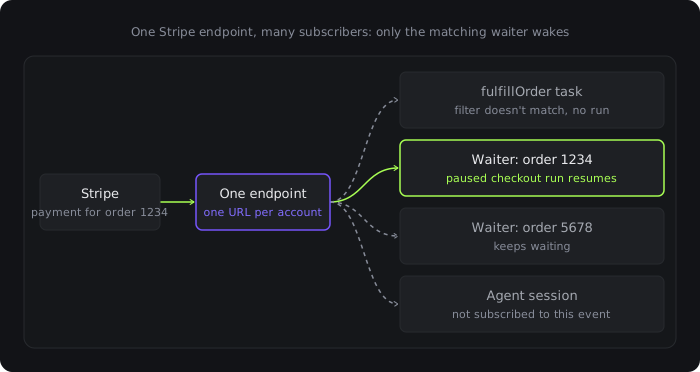
Here's that checkout task. It creates the payment, then pauses until Stripe says whether that exact payment succeeded or failed:
import Stripe from "stripe";import { task, webhooks } from "@trigger.dev/sdk";export const stripe = webhooks.endpoint.define({ id: "stripe", source: webhooks.stripe(),});const stripeClient = new Stripe(process.env.STRIPE_SECRET_KEY!);export const checkout = task({ id: "checkout", run: async ({ orderId, customerId, paymentMethodId }: { orderId: string; customerId: string; paymentMethodId: string }) => { const waiter = await webhooks.waiter.create(stripe, { match: { "event.data.object.metadata.orderId": orderId }, filter: "event.type in ['payment_intent.succeeded', 'payment_intent.payment_failed']", timeout: "1h", idempotencyKey: `payment-${orderId}`, }); const intent = await stripeClient.paymentIntents.create( { amount: 4200, currency: "usd", customer: customerId, payment_method: paymentMethodId, confirm: true, metadata: { orderId } }, { idempotencyKey: `payment-intent-${orderId}` } ); // Most cards succeed straight away, so there's nothing to wait for if (intent.status === "succeeded") return { status: "succeeded" }; const result = await webhooks.waiter.wait(waiter); if (!result.ok) { // Timed out: ask Stripe what happened rather than guessing const latest = await stripeClient.paymentIntents.retrieve(intent.id); return { status: latest.status }; } return { status: result.output.event.type }; },});
The match paths are checked against the event type the same way a filter's are. match is exact equality on purpose: those values are what the waiter index is keyed on, so a payment for order 1234 goes straight to the waiters on order 1234 instead of testing every waiter's filter. A waiter can take a filter too, for anything match can't express, like the list of event types above.
Generating a setup prompt from the user's code
For our users, the slowest part of a webhook integration is configuring the provider's side: find the webhook settings, paste a URL, pick the events, copy a secret back. We wanted a coding agent to be able to do that, so every endpoint has a Copy setup prompt button, and the same prompt comes back from the API as setupPrompt.
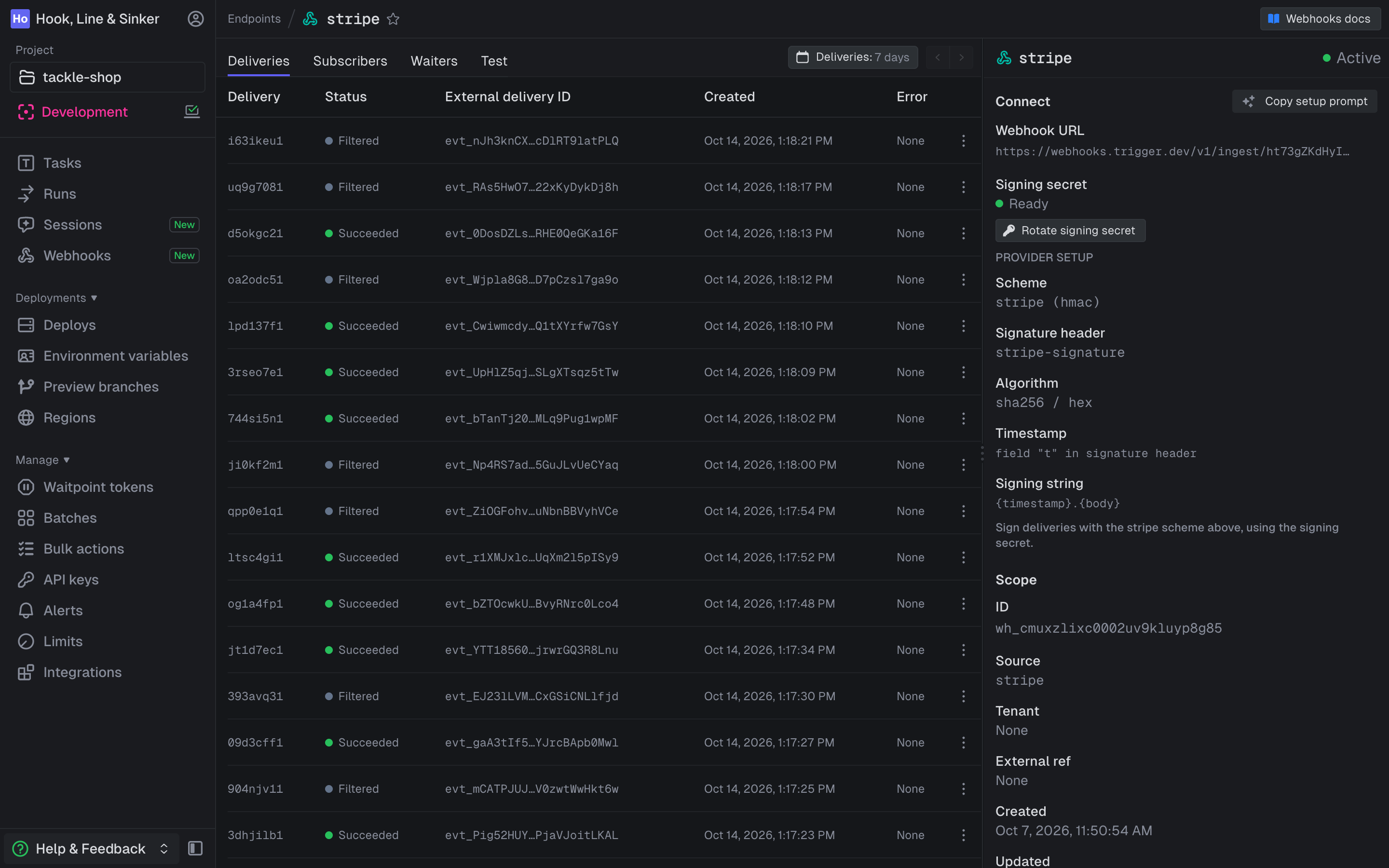
The prompt is generated from your endpoint's code: it lists the subscribers you declared and the events their filters listen for. Here's most of the one for the Stripe endpoint in our demo project, with four subscribers declared:
Register a Trigger.dev webhook endpoint with stripe.## Endpoint- Declared as: stripe- Webhook URL: https://webhooks.trigger.dev/v1/ingest/ht73gZKdHyIvMsZU2Ap1Xw## SubscribersSubscribe stripe to the events these need. A subscriber's filter shows which events it accepts.- fulfill-order (task fulfill-order): `event.type == 'checkout.session.completed'`- large-payments (task large-payments): `event.type == 'payment_intent.succeeded' && event.data.object.amount >= 10000`- process-refund (task process-refund): `event.type == 'charge.refunded'`- order-assistant:order-events (agent order-assistant): `event.type in ['checkout.session.completed', 'charge.refunded']`
Because it lists the events your filters actually listen for, the agent subscribes Stripe to exactly those. It also carries the provider's own quirks, like Stripe only returning the signing secret when the endpoint is created. Named sources ship with their provider's instructions, and webhooks.custom() takes a setupPrompt for your own. Waiters are created at runtime, so the prompt can't see them: if only a waiter uses an event, subscribe the provider to it yourself.
Paste it into Claude Code or any other coding agent, and it can create the Stripe endpoint for you with the Stripe CLI.
Infrastructure choices
This section is about our durable requirement.
Most lost webhooks are lost before any code runs. We designed the infrastructure around the three ways that happens:
- The handler is too slow. Providers don't wait long: Slack wants a 2xx within 3 seconds and GitHub within 10. We answer the provider as soon as the delivery is safely stored, and do everything else afterwards.
- The process dies between receiving and recording. We never acknowledge a delivery until it's on a durable queue.
- A retry is mistaken for a duplicate, or a duplicate for a new event. Every webhook provider delivers at least once, so the same event can arrive more than once. We deduplicate in two layers, built so a crash can't turn a retry into a lost event.
Storing every delivery before we answer the provider
A common way to lose webhooks is to answer the provider with a 200 first and do the work afterwards. The provider treats the webhook as delivered and won't send it again, so if anything goes wrong after that, like a crash or a database outage, the event is gone and nothing tells you.
We do it the other way round. When a webhook arrives, we verify it, check it isn't a duplicate, and put the whole delivery on a durable queue. Only then do we answer the provider with a 200. The queue only confirms a write once it's stored in two availability zones. A background job then saves the delivery to Postgres and routes it to its subscribers, and from there everything happens in a run, where durable compute takes over.
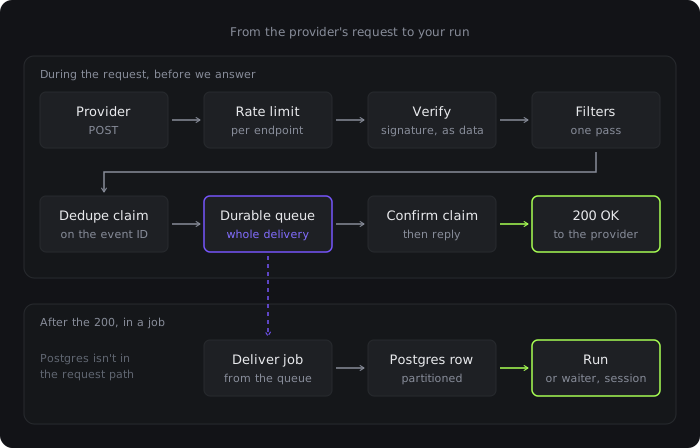
We don't write to Postgres before answering, so we keep accepting deliveries even if the database is down, and the jobs catch up when it's back. We tested it under load by killing the web server, pausing Postgres, pausing the Redis cluster and failing over a primary, and no acknowledged event was lost or started a second run.
Webhook ingress runs on its own servers, separate from the API, so a burst of deliveries can't slow down the dashboard or the trigger API. Deliveries live in their own partitioned database, and each environment and endpoint has its own rate limit, so one customer's burst of deliveries can't hold up anyone else's. Limits follow your plan and can be raised for an endpoint that needs more.
How we deduplicate
Providers retry a webhook until they get a 200, so the same event can arrive more than once. To spot a retry, we need something that stays the same on every attempt, and that's the event ID. The signature won't do: Stripe, for example, retries for up to 3 days and signs every attempt again with a fresh timestamp.
Most named sources know where their provider puts the event ID, and a custom source can point idempotencyField at it. If a source has no event ID at all, we fall back to a hash of the body, timestamp and signature. That still catches a retry that resends exactly the same request, but not one signed again with a fresh timestamp. More on how deliveries are deduplicated.
We deduplicate in two layers: a fast check in Redis when the webhook arrives, and an idempotency key on the run, which is the real guarantee.
The Redis check. The obvious approach is a Redis SET NX on the event ID with a long expiry: the first request sets the key, and any later one finds it and is answered as a duplicate. But if the process crashes after setting the key and before the delivery is queued, the provider's retry finds the key, gets told "duplicate", and the event is lost.
So our check has an extra step. We claim the key, queue the delivery, and only then mark the claim confirmed. If a retry finds a claim that was never confirmed, it queues the delivery again under the same ID. That does nothing if the first attempt's job is already queued, so a crash between the two steps can't lose the event.
The run's idempotency key. Every delivery triggers its task with an idempotency key built from the endpoint and the event's key, kept for the provider's retry window (1 to 3 days). So a retry that gets past Redis, or arrives after Redis has lost the key, finds the existing run and stops there. A resend after that window, like clicking Resend in Stripe's dashboard a week later, starts a new run, so side effects in your handler should still be idempotent, keyed on something like the order ID.
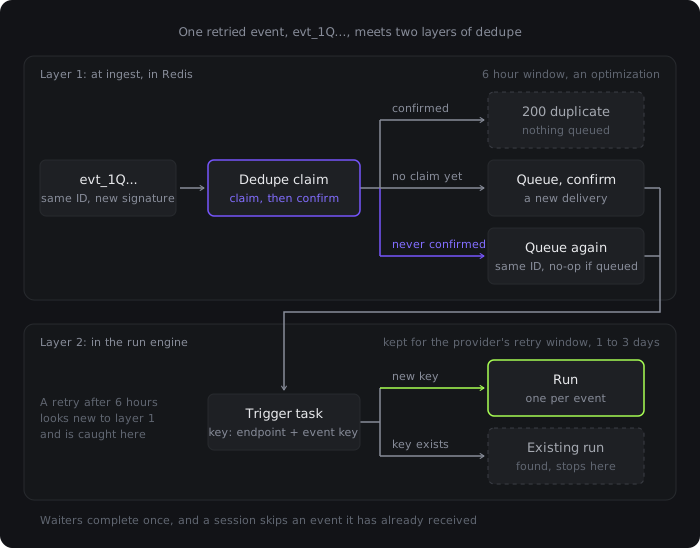
Waiters and agent sessions are covered too. A waiter completes once, and a session skips an event it has already received, so a duplicate can't resume a run twice or make an agent answer the same message twice.
Matching deliveries to waiting runs exactly once
When a delivery arrives, it has to find every waiter it matches and resume each of those runs exactly once, even if the provider sends it again or a Redis node fails partway through.
While a run waits, it's suspended like any other durable wait in Trigger.dev, for up to 90 days, and that wait is stored in Postgres. Redis holds the index a delivery uses to find its waiters quickly. It lives on the same durable cluster as the delivery queue, so a failover doesn't lose a waiter.
Before writing the real code, we built a simulator. It ran the Redis scripts we planned to ship against a 6-node Valkey cluster, an open-source fork of Redis, and injected crashes, failed completions and failovers.
It found two bugs, both in how we handled a delivery that arrived a moment before its waiter was created. We'd planned to hold that delivery in a buffer so the waiter could still match it, but retries racing the buffer resumed some runs twice and left others stuck.
So we dropped the buffer and made one simple rule: a waiter only matches deliveries that arrive after it was created. Both times come from the same Redis server's clock, because the waiter and the delivery's dedupe key live in the same slot. A delivery that arrives too early still goes to any task or other waiter it matches, just not this one.
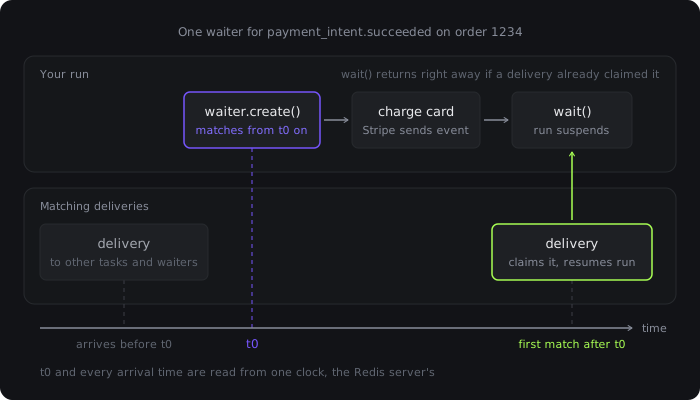
Once waiters only matched deliveries that arrived after they were created, the simulator ran clean through about 385,000 operations and 49,000 injected crashes, including killing a primary mid-run. To check the simulator itself would catch bugs, we planted some on purpose, and the final version caught every one.
The rule is also why create and wait are separate calls. You create the waiter before you charge the card, so the payment webhook can't arrive before the waiter exists. If the webhook arrives before the run reaches wait(), the waiter is already claimed and wait() returns right away.
Fan-out runs on a fair queue per environment, so one customer with lots of waiters can't use up everyone else's processing time. One delivery to 10,000 waiters on the same key resumed them all in 4.4 seconds on a single local Redis node.
Partitioning deliveries by retention and time
Every customer's deliveries go into one WebhookDelivery table, and each delivery holds the provider's full payload. We only keep a delivery for as long as the customer's plan says:
- 3 days on Free, 7 on Hobby and 30 on Pro
- 90, 180 or 365 days on Enterprise
After that, it has to be deleted, or the table grows forever. But deleting expired deliveries row by row could mean deleting hundreds of millions of rows a day, and in Postgres, the only delete that scales is dropping a table.
So we partitioned the table before it shipped. Expiring old deliveries means dropping whole partitions.
We followed Sentry's Snuba, which partitions by retention days, then by week. Our deliveries are partitioned twice: first by retention class, then by time.
WebhookDelivery PARTITION BY LIST ("retentionDays") WebhookDelivery_r7 FOR VALUES IN (7) PARTITION BY RANGE ("createdAt") WebhookDelivery_r7_2026_10_08 FOR VALUES FROM ('2026-10-08') TO ('2026-10-09') WebhookDelivery_r365 FOR VALUES IN (365) PARTITION BY RANGE ("createdAt") WebhookDelivery_r365_2026_10_05 FOR VALUES FROM ('2026-10-05') TO ('2026-10-12')
The 3, 7 and 30 day classes get daily partitions, and 90, 180 and 365 get weekly ones. A daily job creates partitions ten days ahead, and we're alerted well before they run out. An expired partition is detached without blocking reads or writes, then dropped. Postgres only allows one of those detaches at a time per partitioned table, but each class is its own table, so the classes never wait on each other.
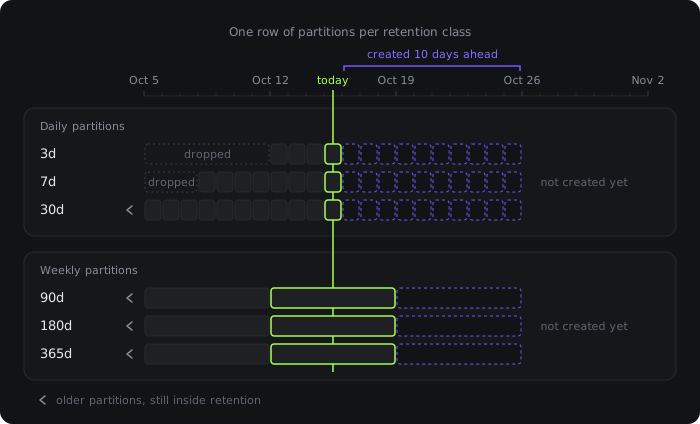
A lookup that knows when a delivery was created and which class it's in reads one partition, and one that doesn't has to check them all. So the delivery ID carries both. An ID is a time-ordered core, then one character for the retention class, then a version character. Given only an ID, we know which partition to read, the delivery page never scans, and an ID that doesn't decode is a 404 without touching the database.
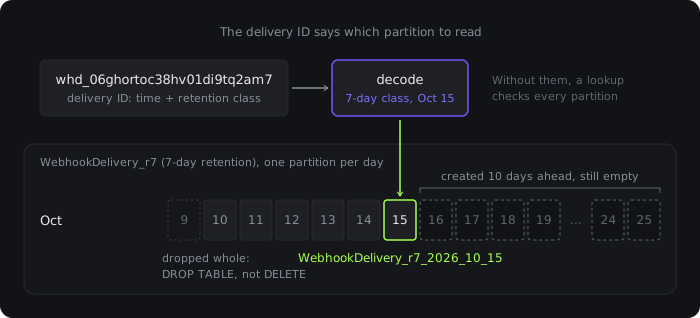
The class is stamped when a delivery is written and never changes. A plan change applies to new deliveries, and old ones age out on the schedule they were written with.
ClickHouse, which holds only delivery metadata, is partitioned the same way, by retention days and week, with a per-row TTL. On about 970,000 seeded deliveries, every Postgres lookup touched a single partition, and a 7-day list in ClickHouse read only the 10 of 76 parts that cover those 7 days. Our tests covered every retention class, customers moving up and down plans, and the nightly job dropping expired partitions.
(Our post on upgrading a 56TB database ended with plans to partition run data by date. Starting that way is a lot easier than migrating to it.)
What's next
Trigger.dev Connect
Trigger.dev Connect will let our users receive webhooks on behalf of their own customers. For example, a product where each customer connects their own Stripe or GitHub account will be able to register an endpoint per customer, and every delivery will say which customer it belongs to.
(Yes, we've said "Connect is coming" before. This time the data model already has room for it.)
Code-based verifiers
Config covers most providers, but not the 10 to 15% that use JWTs or a public key you have to fetch first. Verifying those means running users' own verification code on our servers. We've prototyped it, and we'll add it soon based on the feedback we get.
Webhooks are in public beta in Trigger.dev 4.8.0. To try them, run npx trigger.dev@latest update and follow the docs.