
Managing large, high-traffic production databases with critical user workloads is a particular kind of stress: you can know exactly what you're doing and still hold your breath when you hit Enter.
At Trigger.dev we even have a particular emoji for it:
:bufo-has-seen-things:
This summer we had to upgrade our 56TB AWS Aurora Postgres cluster by 31 July. The upgrade needed a reboot, and a reboot on a database that size meant taking the whole application down - not an option for us.
So instead of moving the whole database, we could leave much of the data behind on the old database: the data that isn't changing constantly, the data that isn't "hot".
Essentially, this meant moving new runs plus the 1.23TB of control plane data (organisations, projects, billing etc.) to PlanetScale.
When Aurora finally rebooted, the only thing that noticed was requests for old runs, for about 90 seconds. And all the runs still completed.
It took a C patch, a failed cutover, and a second attempt the same evening. This is how it went.
First, some context
Trigger.dev is an open source durable execution platform. Much of our recent growth has been driven by startups deploying production AI agents on our platform.
This is why Trigger.dev is a challenging place to manage a database:
- We store lots of data. At the beginning of this project it was 250GB per day.
- There are no quiet hours - we run other people's background work, so load peaks on the hour and bursts overnight, and our users aren't all in one timezone. There's no 3am for us. A run has no predictable lifetime either. Someone can start one that runs for months, so we can't tell you when any given row goes cold.
- Our users run their businesses on top of Trigger.dev so any downtime means customers may lose revenue.
When someone triggers a workload, we call it a run. A run is roughly analogous to an AWS Lambda invocation.
The database situation at the start of the summer
At the start of the summer everything lived in a single Aurora Postgres cluster of roughly 56TB. It was primarily run data: the run table itself had 29.4TB of data and the run-related tables held another 25.4TB.
The rest of the data came to 1.23TB. We call it control plane data and it included data like projects, environments, billing and deployments.
We need to perform an upgrade by July 31
The specific upgrade was Postgres 14.15 to 14.22. Minor version, but an in-place upgrade needs a reboot, and a reboot drops every connection to the database. Since everything was on one cluster, the whole application would go down.
The reboot was pretty much unavoidable but if we moved all the "hot" data off of Aurora first, the impact of the reboot would be much less. Only requests for old runs would be affected, and that data is rarely accessed by our users.

By "live," we mean copying the data to a new database while the old database continues serving production traffic.
The initial copy takes two hours with writes that happened during the copy added to a queue.
Once the bulk copy completes, the writes in the queue are replayed into the new database.
But during the replay writes also arrive. If they arrive faster than the queue is emptied, then it will never drain.
While we're at it, let's switch our database provider
If we had to do a live migration anyway, we wanted to land somewhere we'd rather be.
For this project, PlanetScale Postgres Metal looked better to us than AWS Aurora for three reasons:
- I/O. PlanetScale Metal uses locally attached NVMe rather than network-attached storage. On the current Aurora database, production queries and vacuuming share the same disk. So when a vacuum runs, production slows down. PlanetScale, on the other hand, runs local NVMe drives, so we can expect maintenance will have less of an impact on production.
- Settings changes. On Aurora, changing a parameter meant changing one enormous cluster, and sometimes that meant a reboot. PlanetScale let us change settings without turning each change into a cluster-wide maintenance operation. We wanted settings changes to be boring.
- Upgrades. PlanetScale manages those, which meant one less scary operation for us to own.
We also like the PlanetScale team and trust them. And of course they write nice articles with lots of balls.
How big a database can you actually buy?
Since PlanetScale's Postgres Metal stores data on locally attached NVMe drives rather than network-attached storage, its capacity is limited to what fits on a physical disk.
At the time, the largest available disk was 60TB but our database was already 56TB and growing by 250GB per day. So we needed to split the data across multiple databases.
Hot or not
The data in our database falls into two broad groups: some of it is "hot" - still changing and being used - while the rest is barely touched - not hot.
About 96.8% of runs had completed, and 99% of completed runs had completed within 8.4 days. So the database was full of old run history, even though the useful working window for 99% of runs was about 8.4 days.
The solution - leave behind the old runs
That gave us a way to avoid copying almost 55TB of run data. New runs would be created in the new database, while existing runs would continue running on Aurora. The old run history would stay there too. The only data we needed to copy was the 1.23TB control plane data.
This means three databases:
- Aurora, holding run data created before the switch
- One PlanetScale database hosting the control plane
- Another PlanetScale database hosting new run operations
Routing runs by ID
We gave new runs a new ID format so that the application can tell where a run is located before it queries the database. Old-format IDs point to Aurora. New-format IDs point to the new RunOps database on PlanetScale. The run store inspects the ID, chooses the database, and sends the query there.
We also left room in the new ID format for metadata we might need for future routing. An old run ID is a cuid, like run_cm3x9k2.... A new one is run_ followed by 24 lowercase characters, then a region character and a version character. The run store uses the last two characters for routing based on the region and version of runs. The version character means we can add more run databases later without another ID migration.
Here's the check, lightly trimmed from friendlyId.ts and runOpsResidency.ts:
// New run ids: <24-char core><region char><version char>export function parseRunOpsIdBody(body: string) { if (body.length !== RUN_OPS_ID_LENGTH) return undefined; if (body[RUN_OPS_ID_VERSION_INDEX] !== RUN_OPS_ID_VERSION) return undefined; const region = body[RUN_OPS_ID_REGION_INDEX] ?? ""; if (!REGION_CHAR_PATTERN.test(region)) return undefined; // ...only now decode the core into a timestamp}// Anything else is an old run, which lives on Aurora.export function classifyResidency(id: string): Residency { return classifyKind(id) === "runOpsId" ? "NEW" : "LEGACY";}
Planning the change
By 22 June, all the runs were routed through the run store. We kept it pointed at Aurora so that nothing changed, but it meant fewer unproven changes would be made at the cutover point. It's basically an if-statement. But if incorrect it could break someone's production job.
We built a test suite with one standalone project for each documented feature. On 4 July, we ran all 358 tests against the refactored code. Ten failed, but those same ten failed on main, so the refactor had introduced no new failures.
The biggest risk was a forgotten code path continuing to write to Aurora after the split - this would be dangerous because nothing would necessarily error but the old database would fail to drain. Instead of trusting a code search, we changed Aurora's credentials to use an account without write permission and ran the suite again. Any missed write would fail loudly. But none did.
Building the switch first
To move traffic between databases without downtime we needed a connection pooler. The pooler sits between the application and the database. During the cutover, it pauses client connections while we repoint the backend, then releases them. Without it, we would have had to change the environment variables and restart every service, leading to downtime.
Aurora didn't have a managed pooler that could point to PlanetScale, so we ran our own PgBouncer tier. We used PgBouncer's transaction mode rather than session mode. In transaction mode, the connection is given back after each transaction. So pausing to swap the backend only took around 20 milliseconds. In session mode, the connection is kept for the whole session. Our tests showed it taking more than 30 seconds because nothing was letting go.
The split went live on 14 July, although no organisations moved over yet.
Switching new runs to the new database
The organisations were moved over one by one. The new runs went to PlanetScale while existing runs stayed on Aurora.
Although there is no quiet period overall for Trigger.dev, most of our customers have quiet periods and we tried to make the move during their quiet period. And with someone on the Trigger.dev team monitoring the logs.
On 24 July, we made PlanetScale the default for all new runs.
The copy
That left the 1.23TB control plane to be copied over and then for us to do a live migration.
In parallel, on Tuesday 21 July, we put every production service behind our own PgBouncer. This meant the cutover would only involve repointing the pooler.
On Thursday 23 July, we cut the test-cloud control plane over. And by Friday evening, we'd frozen the code until Sunday.
PlanetScale's migration tool, pgcopydb, first copies the tables. It then replays any writes made during the copy until the new database catches up.
The bulk copy ran on Friday 24 July in the evening. It finished two hours and eleven minutes later with no errors. However, change data capture was stuck for fifteen hours. The replays into PlanetScale were not writing. They were stuck at 0.00 MB/s. So the queue was building up. And it wasn't a traffic issue because Aurora was getting around 120 inserts per second at this point.
The issue was with pgcopydb's buffer. It would flush only at the end of a transaction or when it hit 512MB. When a transaction was big, libpq would copy the whole buffer over and over, with 99% of the CPU going on memmove. Throughput was at 350 statements per second.
We patched pgcopydb to flush every 1MB. A 100,000-statement transaction fell from 2.71 seconds to 0.74.
I hadn't written C for quite some time.

PlanetScale found another problem on Saturday 25 July. pgcopydb was replaying changes for tables we weren't migrating, then discarding them at the end. They shipped another patch to filter them out earlier.
The cutover
During the cutover, PgBouncer pauses the client connections without closing them. Requests wait in a queue instead of failing. We stop replication and wait for PlanetScale to catch up to the last change made on Aurora. We then fix the sequence numbers so new inserts continue correctly, point PgBouncer at PlanetScale, and release the connections.
The sequence looks roughly like this:
cutover_succeeded = falsetry: pause client connections stop replication wait for PlanetScale to catch up fix sequence numbers point PgBouncer at PlanetScale cutover_succeeded = truefinally: if not cutover_succeeded: point PgBouncer back at Aurora resume client connections
The dangerous part is what happens if something fails in the middle. When connections are paused, every client is waiting. If the cutover code crashes, they will keep waiting, meaning the platform is down.
But because of the finally block, if the cutover fails then clients go back to Aurora, and if it works, they go to PlanetScale.
The cutover tool
We built a tool to run the cutover. It's only 35 lines. It's small because it fakes all the outside dependencies (fake pooler admin, fake parameter store, fake clock etc.) which lets us test the cutover first without the database. Then against containers. Then for real.
The switch itself is 35 lines but there are about 17,500 other lines that are designed to make the tool safe.
For example, preflight ran 124 checks before anything was run. And there was a check to ensure that PlanetScale had received all the changes made on Aurora. Also there was a rehearsal mode for testing and runbooks to handle issues that come up.
Before the real cutover, we put the production PgBouncer setup under the tool's control. Applying the existing configuration didn't change where any traffic went, but it made PgBouncer perform the same pause, reload, and resume steps the real cutover would use. That let us test the cutover machinery in production without switching any traffic between databases.
The first cutover
We did a final rehearsal cut on Sunday 26 July at about 13:20 BST. It was successful, so we decided to do the cutover.
We got PlanetScale's support team on a call at 14:00 BST and, after sharing the plan with them, we re-ran preflight.
We made the real cut at 14:18:40 BST.
But it instantly triggered alerts:
- Users were denied access because the database was unavailable.
- New projects failed to create.
- Sentry filled up with errors.
- P99 latency on the trigger API reached about 30 seconds.
We rolled back at 14:20:23 BST.
It turned out to be a PgBouncer configuration issue. More on that below.
The finally block we included worked as expected, pointing PgBouncer back at Aurora and releasing the connections.
Users had seen 105 seconds of errors. Their tasks crashed and restarted but they did not fail.
Reconnecting to Aurora threw a new error, cache lookup failed for type 9772877. This was a side effect of the rollback, not the cause of the failure. Postgres gives every custom type an internal number, but those numbers only have meaning inside the database that created them. During the failed cutover, the application had connected to PlanetScale and cached PlanetScale's numbers. When it went back to Aurora, it asked for a type that only existed on the other side.
The actual cause was in PgBouncer: the application's existing connections kept their old username after we pointed PgBouncer at PlanetScale, and PlanetScale rejected it.
Cleaning up and starting again
During the failed cutover, writes landed on PlanetScale but not Aurora. When we restarted replication, those writes caused unique-constraint errors.
We had three options:
- Reconcile the two databases by hand.
- Restore PlanetScale from that morning's backup and replay forward.
- Clear PlanetScale and copy everything again.
The first two were untested and we had no time to test them, whereas we knew the copy worked.
We checked what had been written to PlanetScale during the cutover. It was only session data, so clearing it would just log some people out. Since we had only five days left before the deadline, we decided to clear it and try again. PlanetScale advised us to make a backup of the target first. Afterwards, we confirmed the decision to clear it:
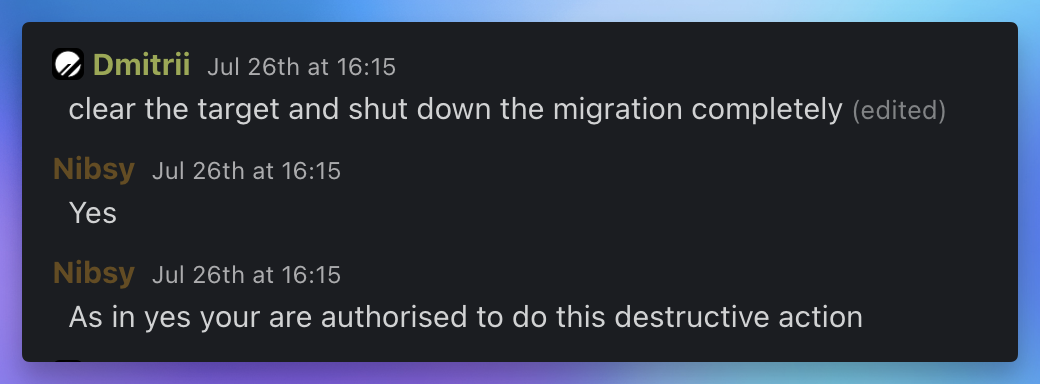
PlanetScale started the copy again at 16:26 and it was successful. Replication caught up at 18:45.
Finding the bug
By the evening we had the cause. A PlanetScale engineer reached the same conclusion independently, which gave us enough confidence to try again.
PgBouncer keeps separate pools for each database name and username. Before the cutover, the application connected to writer with its original username, and writer pointed to Aurora.
During the cutover, we pointed writer to PlanetScale and configured PlanetScale's required username. New connections used the new username and worked. Existing connections stayed in the old pool, still keyed to that original username. When we resumed traffic, those existing connections tried to connect to PlanetScale with the original username. PlanetScale rejected them.
The fix was to set a username explicitly for both databases. A cutover now changes Aurora's username to PlanetScale's username. A rollback changes it back. PgBouncer could handle that. What it couldn't do was add one to existing connections, or remove one at all.
Why the rehearsal didn't catch the bug
The bug only appears when application connections that were opened before the switch are still open after it. The rehearsal on the day applied the existing configuration, so it never changed the username, and never could have hit it. The one earlier test that did change the username had a typo in it. We pointed at the wrong database, corrected it, and by the time we ran the cut, every connection had been recycled. That test went green because of the mistake.
The second cutover
At around 20:45 BST that evening we tried the cutover again. Within a couple of seconds, the tool reported success. And this time, the errors did not appear!
We spent a nervous minute checking that traffic was flowing and that the data was where it should be. That finished the migration.
Four days later: the upgrade
On 30 July, before our deadline, we upgraded Aurora to Postgres 14.22.
In testing, the restart took 7.9 seconds and kept all 416 connections open. Because of an unclean shutdown that happened earlier, production could not use a fast restart, so it dropped 107 of 112 writer connections.
For 90 seconds, while the application reconnected, requests for old runs failed. But importantly, the runs kept going, retrying on a five-second poll interval.
New runs and the control plane were unaffected since they were already on PlanetScale.
And so, we finished the upgrade before the deadline, woot woot!
Conclusions
What we'd do differently
Since PgBouncer operates at the TCP level and it doesn't know what's inside a connection, I assumed that it could be tested in an isolated way. But when you switch the database underneath it, the connection changes how it behaves. So next time we would leave the connections open when rehearsing.
What's next for run storage
Our new RunOps database is still growing at a fast rate. We have some plans in the works to have a sort of "holding" database for running jobs and a database for completed runs.
So when we know that all runs in a database are completed, we can partition them by date of deletion and then we can easily introduce a retention period for the data.
If you'd rather build AI agents than patch C in a Postgres replication tool on a Saturday, give Trigger.dev a try.