
We built a chat agent to help our users in our developer dashboard (debug, make charts, get answers from docs etc.).
Here are seven things we learned along the way.
We're open source, so we've linked to the actual code throughout.
1. Make the first reply fast (and informative)
If your agent does real work (tools, files, a sandbox), it probably runs somewhere that takes a moment to start.
But if you leave the user staring at a blank loader with no feedback, it looks broken. So you want to return something, even just a tool call update.
We split it in two:
- The first model call happens straight away from the request handler - an ordinary web server route - that receives the message, and streams the response from the model provider right back.
- At the same time, start the heavier agent.
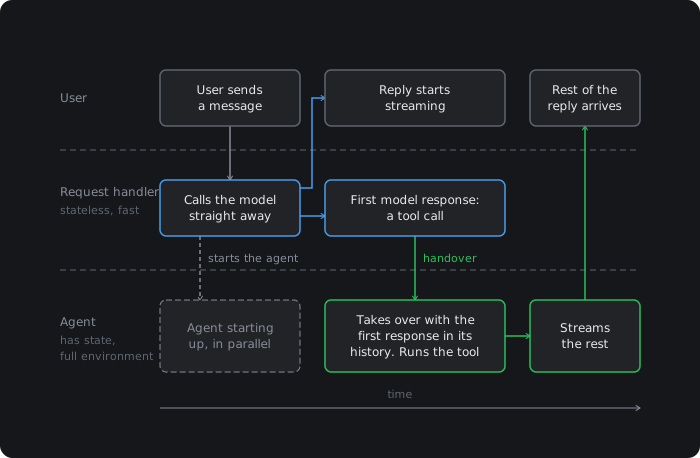
In our experience, this first response from the model is usually a tool call (unless the user just says "hi"), and with the tool call response, you can show to the user that something is happening.
Our platform runs AI agents and a user might ask what happened to a specific run with id abc123.
In this case even seeing that get_run("abc123") is happening helps the user feel like something is working.
When you get that initial response from the model, you can do the handover to the agent that is getting ready (or ideally is ready) in the background.
The agent takes that first response (e.g. get_run("abc123")) and executes any tool calls and takes over the conversation.
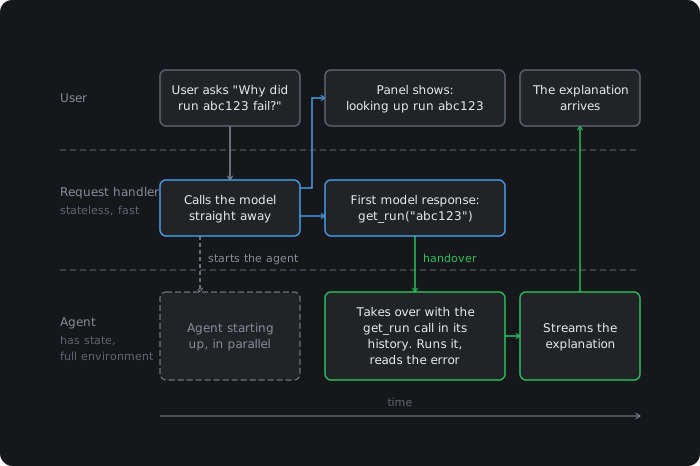
The handover is tricky. When the agent fires up we need to give it the context from the request handler:
- Everything from the first step (text / tool calls)
- If the turn completed
- The ID of the message sent, so that there won't be two separate messages.
At the end of the turn/step the request handler stops being involved.
Some other things to keep in mind:
- Keep the exact same prompt. Or caching won't work.
- Use the same model - to avoid tone changing halfway.
- If the first step fails, throw an error and end the turn.
For us, doing this cut the time to a useful update coming back in half. And so we built it into our chat.agent framework (here's the handover code).
There are more numbers on the fast starts docs page.
Why not just run the whole agent in the request handler?
It's fine if you're just doing a straight LLM response but if you want tool calls / sandbox etc. you need state and something long running. It's sort of like how you wouldn't encode a video in a request handler.
2. Count tokens accurately for compaction
Long conversations get compacted: summarised and trimmed to fit the model's context window. That should only kick in when a conversation is genuinely long, and to know that you need the right token count.
Initially we added up the input tokens of every step in a turn.
But each step will have the whole conversation thus far repeated.
With this mistake we saw one question with five tool call steps counted as 178,926 input tokens when the real figure was 39,557.
This mistake led to premature compaction. This is bad.
Instead, just use the last step's input token count.
Why just input tokens?
Anything sent as output by the model gets passed as input on the next step, so it's already counted.
You can see our compaction code.
3. Set a sensible number of retries
If a model tries to call a tool that fails, it will probably try over and over again. Generally that's not good.
So, instead count consecutive retries in the tool call, and set a max retries.
It's inside the tool itself because network blips probably shouldn't count. Retry those inside the tool with a short backoff and leave them out of the count.
Here's some simple illustrative code. Or you can check out ours here.
let failuresInARow = 0;async function runQueryTool(query: string) { if (failuresInARow >= 3) { return { error: "Query limit reached. Answer with what you already have.", }; } const result = await runQuery(query); if (result.ok) { failuresInARow = 0; return result.rows; } failuresInARow++; if (failuresInARow < 3) { return { error: result.error }; } return { error: `${result.error} That's 3 failed queries in a row. ` + "Stop querying and answer with what you already have.", };}
4. Make the conversation resumable
During a chat the connection can drop for many reasons.
If a turn is streaming while it drops, a naive implementation would still show a reply that looks like it's generating forever.
Instead, you should give every streamed event an ID, so that when the client reconnects it can resume the last turn it sees.
Making the stream durable
To do this, the reply can't just be an HTTP response. You need some durable state. So that the client can tell you "the last chunk I got had id 43." And then you can resend everything from id 44 onwards. Or if the turn had finished while the client was away, you can send down the whole message.
const res = await fetch(`/chat/${chatId}/stream`, { headers: { "Last-Event-ID": lastSeq },});
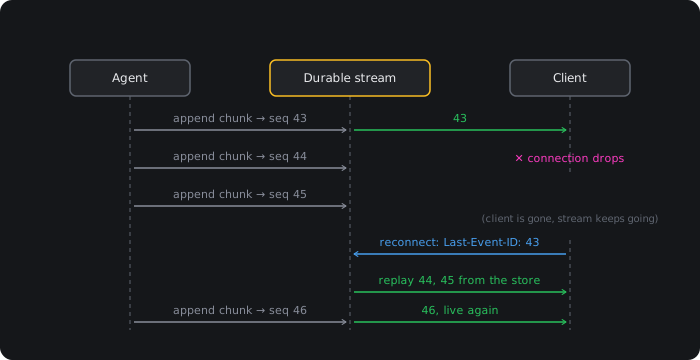
The server replays what the client missed, then carries on live.
If you're hand-rolling this, the tricky part is storing the stream, not just sending it.
There are libraries that do it on top of Redis, like resumable-stream. We use a durable stream built on top of object storage called s2.dev: every chunk appended to it receives a sequence number, so in chat.agent reconnecting with the last one you saw is built in.
Show the tool calls
Also, show the tool calls as they happen so users know what's going on.
Although, this might vary depending on your audience - our customers are developers and we know they appreciate seeing tool calls. If you're building a travel agent chatbot, it might be different.
Most of the agent libraries make it easy to stream down tool calls the same way messages are streamed down. For instance, in AI SDK, toUIMessageStream() includes the tool call deltas. So on the client side you can just listen in for tool call deltas.
// Client: tool calls are message parts, like text is.for (const part of message.parts) { if (part.type === "text") { renderText(part.text); } else if (part.type.startsWith("tool-")) { // part.state is one of: "input-streaming", // "input-available", "output-available", "output-error" const name = part.type.slice(5); renderToolCall(name, part.state, part.input, part.output); }}
Do the same for incoming messages
The other side of the coin is when a user sends multiple messages.
In Claude Code, the user has the ability to send multiple messages and has the option for them to be added to a queue (by default) or to be sent immediately and used to steer.
To support this behaviour, incoming messages should be written to an ordered, durable inbox.
Then the agent can check the inbox between steps and between turns. Between steps it will pick up any messages marked for steering and add it as a user message. Between turns it will pick up the oldest message.
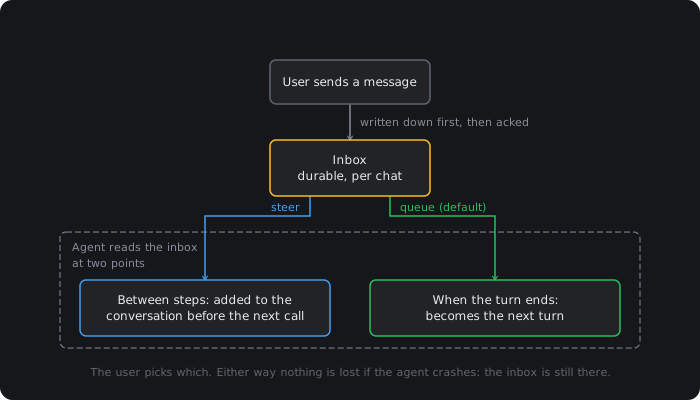
Our chat.agent has this as pending messages.
5. Version your prompts
Prompts are important and refining them takes time, effort and iterations.
So iteration has to be easy, otherwise you’ll make fewer changes than you should.
We recommend defining the prompt in code, keeping every version, and letting yourself switch to a new version from the dashboard without deploying. (This is how prompts work in Trigger, and here's our agent's prompts file.)
You can also tag every prompt with its model. Then you'll know if a model is causing lots of bad responses.
A prompts table might look like this:
type PromptVersion = { id: string; version: number; model: string; text: string; override: boolean; metadata: { temperature?: number; changedBy?: string; note?: string; };};
And on deploy, the prompt in the repo can become a new version.
async function savePromptOnDeploy(prompt: Prompt) { const latest = await db.prompts.latest(prompt.id); const changed = latest?.text !== prompt.text || latest?.model !== prompt.model; if (changed) { await db.prompts.insert({ ...prompt, override: false }); }}
Combine this with evals and you can be way more scientific in your prompt engineering.
6. Tools fit for an agent
Tools are pretty important. Here are some tips for making them work better:
Tell the tool where the edges are: In the tool definition but also in the API response. e.g. If a tool uses truncation of results, make sure it's obvious in the response.
Let the agent render: Something we really liked is that our agent has a render_view tool. It uses it a lot and we think it's useful to our users. It has stuff like
- A failure card
- A next-steps button
- A "live investigation" card
- A chart component with our brand colors and nice defaults.
Give it a feedback tool: You can tighten the loop on debugging if you let the agent submit feedback. Can just be an API for a form submission.
Give it the user's context: A lot of people expect the agent to know what the user is looking at. For us they might be looking at a specific run asking why it failed. Give your agent a get_current_page tool and it will go a long way.
Give your agent sub agents: Sub agents are a good way for your main agent to parallelise tasks AND reduce context bloat. Consider giving them that power.
Give your agent a machine: If it has a machine it can do more. e.g. pull down a user's code, run a script, reproduce a failure.
7. Evals and observability
We run evals on a sample of completed turns as separate background jobs.
And we have full observability over every step the agent made.
This is especially handy with tool calls which can be quite hard to visualise.
So when a conversation is eval'd as bad, we can go in and see exactly what went wrong and make improvements.
We do evals like this:
- When a turn completes, 10% of turns are sent to a separate eval job.
- A judge model gets the question, the tool results and the answer. It scores it 1 to 5 for grounded, answered and concise, and flags a missing tool, a docs gap or a hallucination.
- We store the scores with the prompt version. Not the question or the answer.
Trigger has this built in so we can't show you the code without shilling. But to illustrate the point, this is roughly what your code might look like:
const verdict = await generateObject({ model: judgeModel, schema: z.object({ grounded: z.number().min(1).max(5), answered: z.number().min(1).max(5), concise: z.number().min(1).max(5), signals: z.array( z.enum(["missing_tool", "docs_gap", "hallucination"]) ), }), prompt: `Question: ${userText}Tool results: ${toolResults}Answer: ${answer}`,});await db.turnEvals.insert({ chatId, turn, promptVersion, ...verdict.object,});
If you're building a chat agent, give Trigger.dev's chat.agent a try.