Trigger.dev v4 brings self-hosting capabilities to Kubernetes environments. Alongside our Docker option, we now offer native Kubernetes deployment through our official Helm chart, which makes running the self-hosted version of Trigger.dev at scale much simpler.
This post focuses on self-hosting with Kubernetes using Helm, great for teams who need the orchestration, scaling, and reliability features that Kubernetes provides. If you're looking for a simpler setup, check out our Docker compose guide.
In this post, I'll walk you through:
- Why you might want to self-host on Kubernetes
- What's new in v4 for Kubernetes self-hosters
- What to expect
- A brief Kubernetes self-hosting overview
Why self-host Trigger.dev on Kubernetes?
For the majority of use cases, Trigger.dev Cloud provides the best experience. It's completely managed, handles scaling automatically, and includes dedicated support. However, there are situations where you might be required to self-host. If this is the case, Kubernetes is a great option.
When does Kubernetes self-hosting make sense?
- You're already running Kubernetes infrastructure and want consistent deployment patterns.
- Your organization has strict compliance needs (e.g. data residency) requiring Kubernetes-native security controls.
- You need to deploy Trigger.dev in an air-gapped or private Kubernetes environment.
- You're developing solutions that require tight integration with existing Kubernetes tooling and workflows.
When isn't it the right choice?
- You're unfamiliar with Kubernetes and prefer the most straightforward setup (use Docker instead or try the Cloud).
- Your team doesn't have Kubernetes experience and you want to avoid extra operational complexity.
- You prefer the quickest route to production without managing Kubernetes infrastructure.
Cloud vs. self-hosted v4:
Here's how Cloud and self-hosted v4 compare feature-wise:
| Feature | Cloud | Self-hosted |
|---|---|---|
| Warm starts | ✅ | ❌ |
| Auto-scaling | ✅ | ❌ |
| Checkpoints | ✅ | ❌ |
| Dedicated support | ✅ | ❌ |
| Community support | ✅ | ✅ |
| ARM support | ✅ | ✅ |
What's new in v4 for Kubernetes self-hosting?
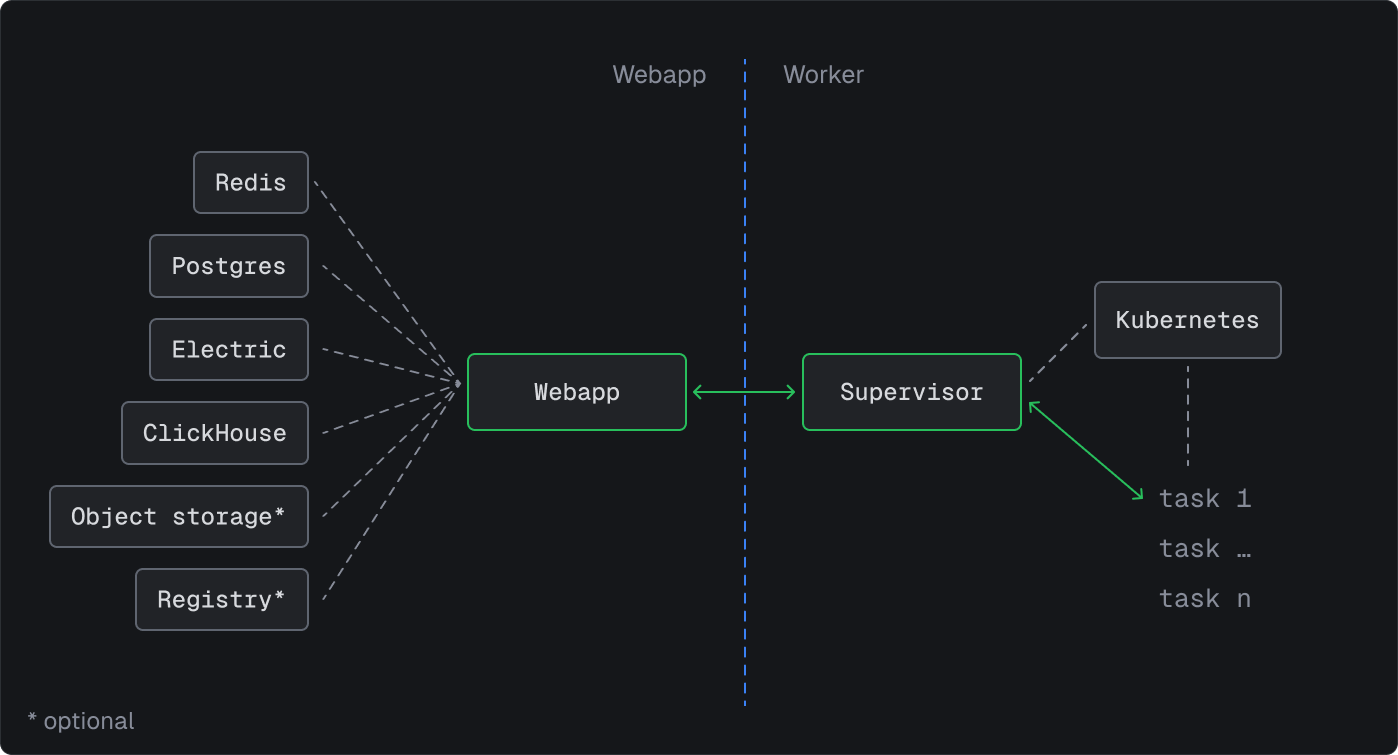
Key improvements from v3 to v4:
- Helm chart with sensible defaults – eliminates the need for custom Kubernetes manifests.
- Integrated Postgres, Redis, and object storage, removing the requirement to configure external services unless desired.
- Streamlined, more reliable worker management using Kubernetes-native scaling capabilities.
Deployment is simplified:
- Helm chart deployment is simple and straightforward.
- Environment variables have improved documentation and consistency across deployment methods.
- Resource limits and configurations follow standard Kubernetes conventions.
The Kubernetes self-hosting experience: what to expect
Deploying Trigger.dev on Kubernetes offers significant flexibility, but it brings additional responsibilities and considerations. Here's what to expect when choosing the Kubernetes self-hosted path:
Your responsibilities include:
- Setting up and maintaining your Kubernetes cluster (EKS, GKE, AKS, or self-managed).
- Managing Helm chart updates, security patches, and scaling configurations.
- Overseeing cluster and application uptime and performance monitoring.
What comes included:
- Helm chart containing all necessary components.
- ClickHouse, Postgres, Redis, and object storage with external service support.
- Complete core Trigger.dev functionality, excluding some Cloud-exclusive features.
What's missing:
- Fully managed cluster scaling (though Kubernetes provides scaling capabilities).
- Warm starts.
- Checkpoints (non-blocking waits), meaning longer waits consume more resources.
- Kubernetes expertise is your responsibility, though our self-hosting Discord community is very active and can offer great advice.
Premium support:
- We do offer enterprise support for Kubernetes self-hosters. Get in touch if that's something you're interested in.
Kubernetes self-hosting overview
Self-hosting Trigger.dev v4 on Kubernetes is now available for the first time, though it still requires Kubernetes knowledge and operational experience. Here's what you need to understand before getting started:
Prerequisites
- Kubernetes cluster: A cluster with version 1.19+ and Helm 3.8+. Works with managed services (EKS, GKE, AKS) or self-managed clusters.
- Resources: At least 6+ vCPU and 12+ GB RAM across your cluster, plus persistent volume capability.
- Database: Postgres comes with the Helm chart, though external managed databases are supported if preferred.
- Email provider: For magic link authentication, configure SMTP using a service like Resend.
Scaling considerations
- Begin with default resource allocations, then plan expansion based on your workload patterns.
- Consider leveraging external managed services (RDS, Redis Cloud) for enhanced production reliability.
- Track resource consumption and modify CPU/memory limits through Helm values as requirements change.
Best practices & gotchas
- Version locking: Always pin your Helm chart version to avoid surprises when updating.
- Configuration: Use separate
values.yamlfiles for different environments. - Email setup: Test your magic link email flow early to avoid login headaches. Check the webapp pod logs for any email configuration errors.
- GitHub auth: You can use GitHub authentication as an alternative to email.
- Security: Use Kubernetes network policies to secure your deployment. Don't expose services publicly without proper authentication.
Operations & maintenance
- Updates are simple: bump your Helm chart version and run
helm upgrade. - Should you find yourself investing more time in Kubernetes operations than development, you can always migrate to Trigger.dev Cloud.
Get started with Kubernetes self-hosting
- Follow the Kubernetes self-hosting guide to get started.
- Join the Discord self-hosting channel for support.