> ## Documentation Index
> Fetch the complete documentation index at: https://trigger.dev/docs/llms.txt
> Use this file to discover all available pages before exploring further.
# Alerts
> Get alerted when runs or deployments fail, or when deployments succeed.
We support receiving alerts for the following events:
* Run fails
* Deployment fails
* Deployment succeeds
## How to setup alerts
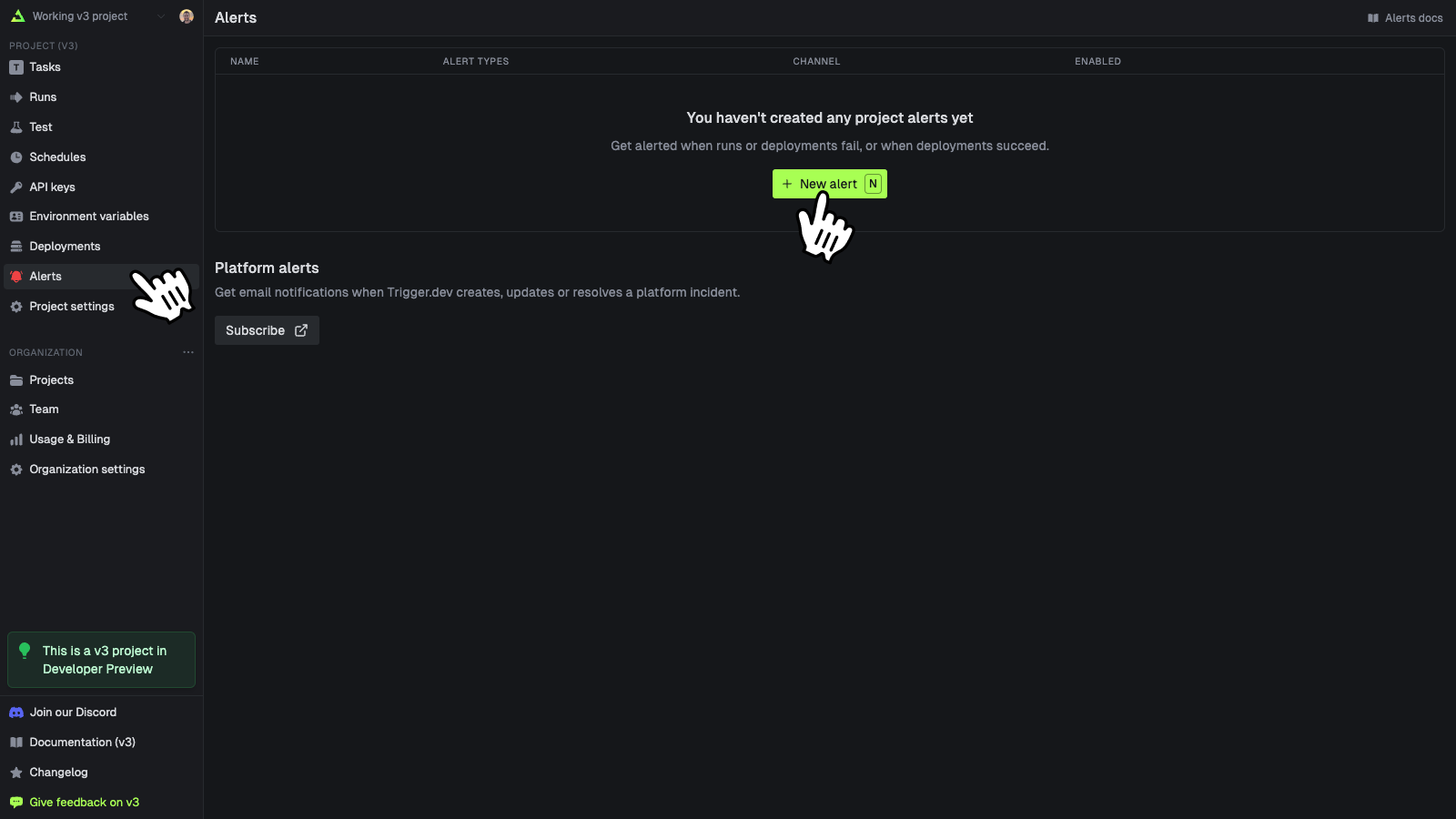
Click on "Alerts" in the left hand side menu, then click on "New alert" to open the new alert modal.
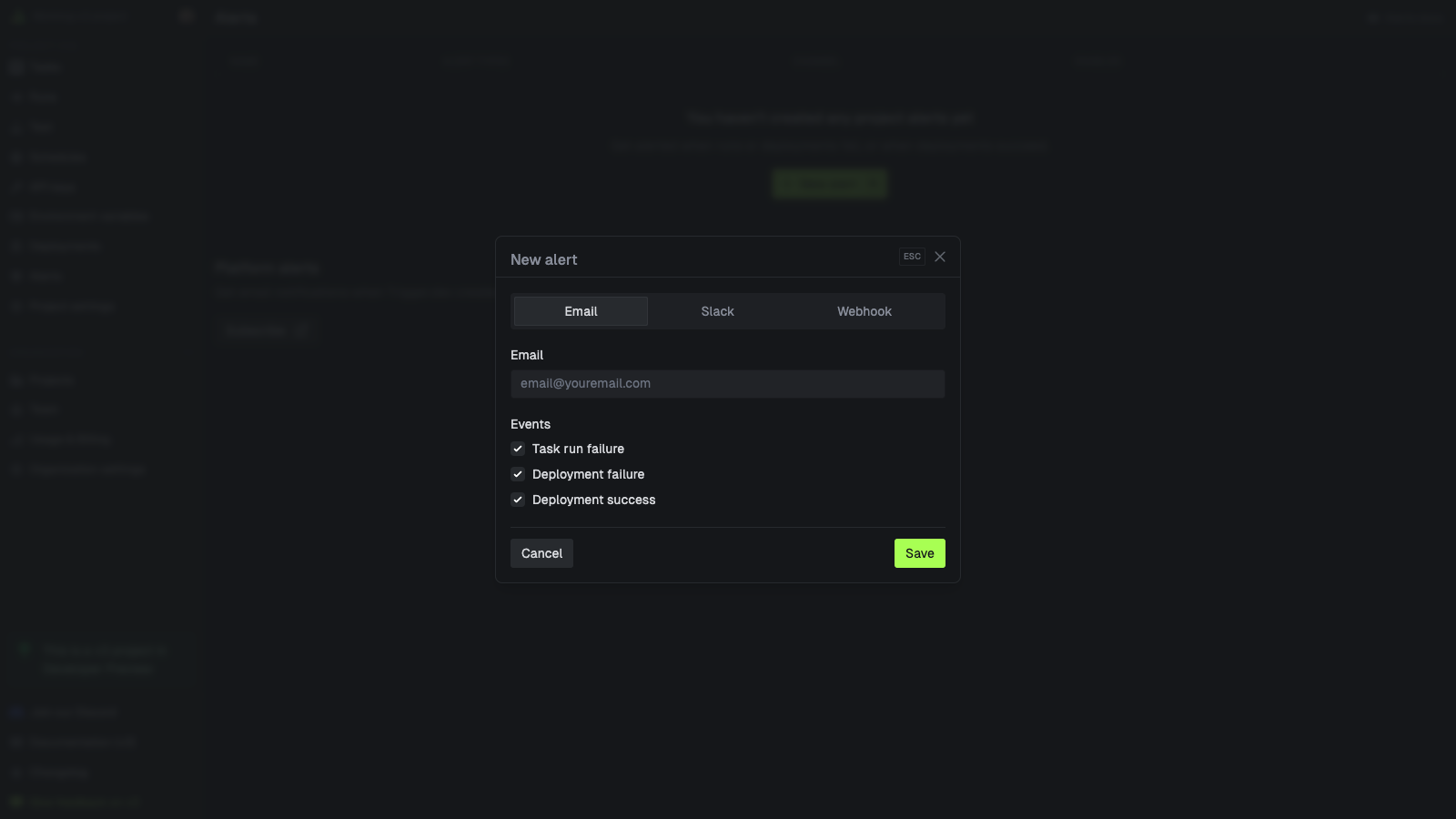
 Choose to be notified by email, Slack notification or webhook whenever:
* a run fails
* a deployment fails
* a deployment succeeds
Choose to be notified by email, Slack notification or webhook whenever:
* a run fails
* a deployment fails
* a deployment succeeds
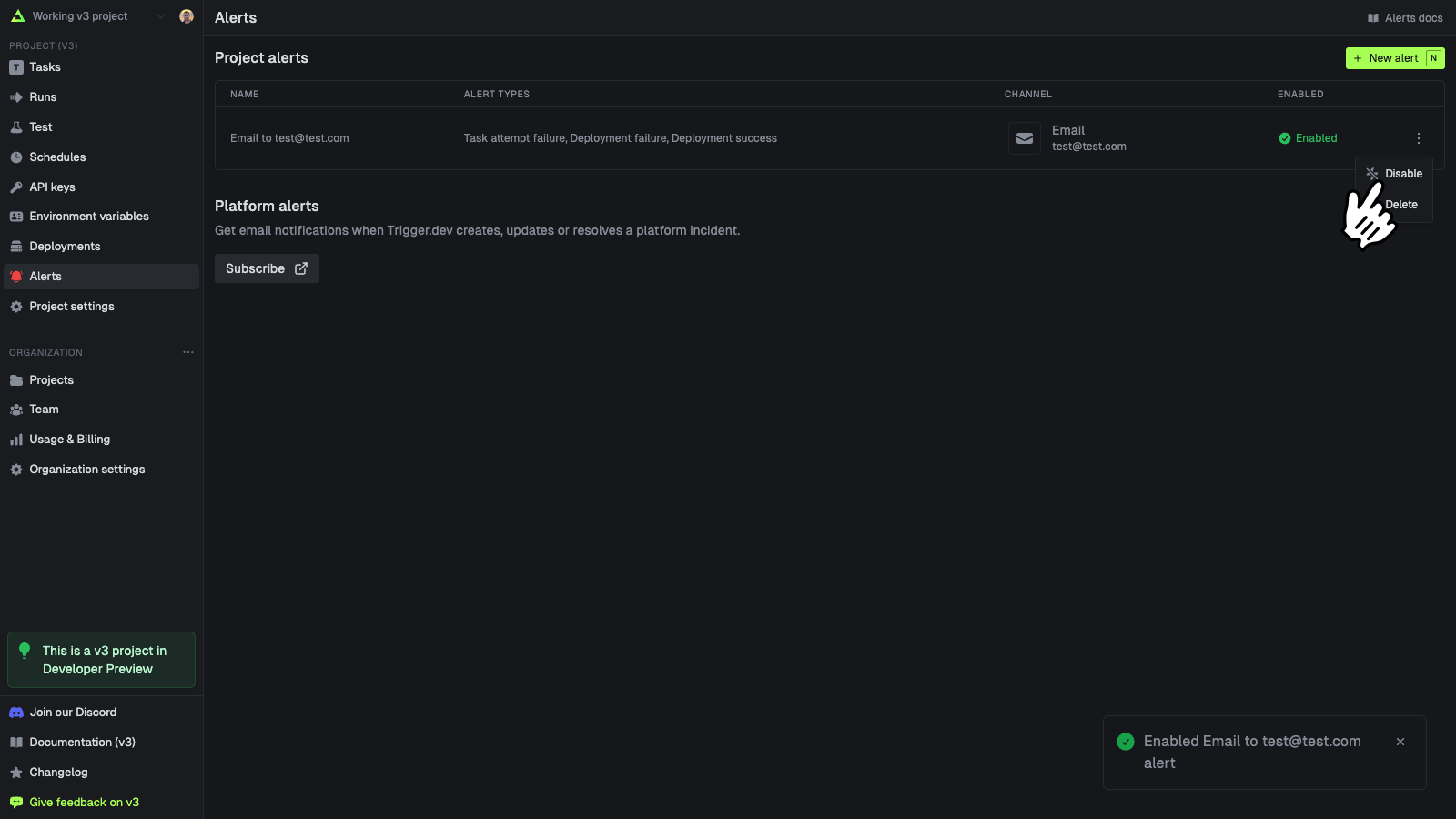
 Click on the triple dot menu on the right side of the table row and select "Disable" or "Delete".
 ## Alert webhooks
For the alert webhooks you can use the SDK to parse them. Here is an example of how to parse the webhook payload in Remix:
```ts theme={"theme":"css-variables"}
import { ActionFunctionArgs, json } from "@remix-run/server-runtime";
import { webhooks, WebhookError } from "@trigger.dev/sdk";
export async function action({ request }: ActionFunctionArgs) {
// Make sure this is a POST request
if (request.method !== "POST") {
return json({ error: "Method not allowed" }, { status: 405 });
}
try {
// Construct and verify the webhook event
// This secret can be found on your Alerts page when you create a webhook alert
const event = await webhooks.constructEvent(request, process.env.ALERT_WEBHOOK_SECRET!);
// Process the event based on its type
switch (event.type) {
case "alert.run.failed": {
console.log("[Webhook Internal Test] Run failed alert webhook received", { event });
break;
}
case "alert.deployment.success": {
console.log("[Webhook Internal Test] Deployment success alert webhook received", { event });
break;
}
case "alert.deployment.failed": {
console.log("[Webhook Internal Test] Deployment failed alert webhook received", { event });
break;
}
default: {
console.log("[Webhook Internal Test] Unhandled webhook type", { event });
}
}
// Return a success response
return json({ received: true }, { status: 200 });
} catch (err) {
// Handle webhook errors
if (err instanceof WebhookError) {
console.error("Webhook error:", { message: err.message });
return json({ error: err.message }, { status: 400 });
}
if (err instanceof Error) {
console.error("Error processing webhook:", { message: err.message });
return json({ error: err.message }, { status: 400 });
}
// Handle other errors
console.error("Error processing webhook:", { err });
return json({ error: "Internal server error" }, { status: 500 });
}
}
```
### Common properties
When you create a webhook alert, you'll receive different payloads depending on the type of alert. All webhooks share some common properties:
A unique identifier for this webhook event
When this webhook event was created
The version of the webhook payload format
The type of alert webhook. One of: `alert.run.failed`, `alert.deployment.success`, or `alert.deployment.failed`
### Run Failed Alert
This webhook is sent when a run fails. The payload is available on the `object` property:
Unique identifier for the task
File path where the task is defined
Name of the exported task function
Version of the task
Version of the SDK used
Version of the CLI used
Unique identifier for the run
Run number
Current status of the run
When the run was created
When the run started executing
When the run finished executing
Whether this is a test run
Idempotency key for the run
Associated tags
Error information
Whether the run was an out-of-memory error
Machine preset used for the run
URL to view the run in the dashboard
Environment ID
Environment type (STAGING or PRODUCTION)
Environment slug
Organization ID
Organization slug
Organization name
Project ID
Project reference
Project slug
Project name
### Deployment Success Alert
This webhook is sent when a deployment succeeds. The payload is available on the `object` property:
Deployment ID
Deployment status
Deployment version
Short code identifier
When the deployment completed
Array of deployed tasks with properties: id, filePath, exportName, and triggerSource
Environment ID
Environment type (STAGING or PRODUCTION)
Environment slug
Organization ID
Organization slug
Organization name
Project ID
Project reference
Project slug
Project name
### Deployment Failed Alert
This webhook is sent when a deployment fails. The payload is available on the `object` property:
Deployment ID
Deployment status
Deployment version
Short code identifier
When the deployment failed
Error name
Error message
Error stack trace (optional)
Standard error output (optional)
Environment ID
Environment type (STAGING or PRODUCTION)
Environment slug
Organization ID
Organization slug
Organization name
Project ID
Project reference
Project slug
Project name
## Alert webhooks
For the alert webhooks you can use the SDK to parse them. Here is an example of how to parse the webhook payload in Remix:
```ts theme={"theme":"css-variables"}
import { ActionFunctionArgs, json } from "@remix-run/server-runtime";
import { webhooks, WebhookError } from "@trigger.dev/sdk";
export async function action({ request }: ActionFunctionArgs) {
// Make sure this is a POST request
if (request.method !== "POST") {
return json({ error: "Method not allowed" }, { status: 405 });
}
try {
// Construct and verify the webhook event
// This secret can be found on your Alerts page when you create a webhook alert
const event = await webhooks.constructEvent(request, process.env.ALERT_WEBHOOK_SECRET!);
// Process the event based on its type
switch (event.type) {
case "alert.run.failed": {
console.log("[Webhook Internal Test] Run failed alert webhook received", { event });
break;
}
case "alert.deployment.success": {
console.log("[Webhook Internal Test] Deployment success alert webhook received", { event });
break;
}
case "alert.deployment.failed": {
console.log("[Webhook Internal Test] Deployment failed alert webhook received", { event });
break;
}
default: {
console.log("[Webhook Internal Test] Unhandled webhook type", { event });
}
}
// Return a success response
return json({ received: true }, { status: 200 });
} catch (err) {
// Handle webhook errors
if (err instanceof WebhookError) {
console.error("Webhook error:", { message: err.message });
return json({ error: err.message }, { status: 400 });
}
if (err instanceof Error) {
console.error("Error processing webhook:", { message: err.message });
return json({ error: err.message }, { status: 400 });
}
// Handle other errors
console.error("Error processing webhook:", { err });
return json({ error: "Internal server error" }, { status: 500 });
}
}
```
### Common properties
When you create a webhook alert, you'll receive different payloads depending on the type of alert. All webhooks share some common properties:
A unique identifier for this webhook event
When this webhook event was created
The version of the webhook payload format
The type of alert webhook. One of: `alert.run.failed`, `alert.deployment.success`, or `alert.deployment.failed`
### Run Failed Alert
This webhook is sent when a run fails. The payload is available on the `object` property:
Unique identifier for the task
File path where the task is defined
Name of the exported task function
Version of the task
Version of the SDK used
Version of the CLI used
Unique identifier for the run
Run number
Current status of the run
When the run was created
When the run started executing
When the run finished executing
Whether this is a test run
Idempotency key for the run
Associated tags
Error information
Whether the run was an out-of-memory error
Machine preset used for the run
URL to view the run in the dashboard
Environment ID
Environment type (STAGING or PRODUCTION)
Environment slug
Organization ID
Organization slug
Organization name
Project ID
Project reference
Project slug
Project name
### Deployment Success Alert
This webhook is sent when a deployment succeeds. The payload is available on the `object` property:
Deployment ID
Deployment status
Deployment version
Short code identifier
When the deployment completed
Array of deployed tasks with properties: id, filePath, exportName, and triggerSource
Environment ID
Environment type (STAGING or PRODUCTION)
Environment slug
Organization ID
Organization slug
Organization name
Project ID
Project reference
Project slug
Project name
### Deployment Failed Alert
This webhook is sent when a deployment fails. The payload is available on the `object` property:
Deployment ID
Deployment status
Deployment version
Short code identifier
When the deployment failed
Error name
Error message
Error stack trace (optional)
Standard error output (optional)
Environment ID
Environment type (STAGING or PRODUCTION)
Environment slug
Organization ID
Organization slug
Organization name
Project ID
Project reference
Project slug
Project name