> ## Documentation Index
> Fetch the complete documentation index at: https://trigger.dev/docs/llms.txt
> Use this file to discover all available pages before exploring further.
# Tasks: Overview
> Tasks are functions that can run for a long time and provide strong resilience to failure.
There are different types of tasks including regular tasks and [scheduled tasks](/tasks/scheduled).
## Hello world task and how to trigger it
Here's an incredibly simple task:
```ts /trigger/hello-world.ts theme={"theme":"css-variables"}
import { task } from "@trigger.dev/sdk";
const helloWorld = task({
//1. Use a unique id for each task
id: "hello-world",
//2. The run function is the main function of the task
run: async (payload: { message: string }) => {
//3. You can write code that runs for a long time here, there are no timeouts
console.log(payload.message);
},
});
```
You can trigger this in two ways:
1. From the dashboard [using the "Test" feature](/run-tests).
2. Trigger it from your backend code. See the [full triggering guide here](/triggering).
Here's how to trigger a single run from elsewhere in your code:
```ts Your backend code theme={"theme":"css-variables"}
import { helloWorld } from "./trigger/hello-world";
async function triggerHelloWorld() {
//This triggers the task and returns a handle
const handle = await helloWorld.trigger({ message: "Hello world!" });
//You can use the handle to check the status of the task, cancel and retry it.
console.log("Task is running with handle", handle.id);
}
```
You can also [trigger a task from another task](/triggering), and wait for the result.
## Defining a `task`
The task function takes an object with the following fields.
### The `id` field
This is used to identify your task so it can be triggered, managed, and you can view runs in the dashboard. This must be unique in your project – we recommend making it descriptive and unique.
### The `run` function
Your custom code inside `run()` will be executed when your task is triggered. It’s an async function that has two arguments:
1. The run payload - the data that you pass to the task when you trigger it.
2. An object with `ctx` about the run (Context), and any output from the optional `init` function that runs before every run attempt.
Anything you return from the `run` function will be the result of the task. Data you return must be JSON serializable: strings, numbers, booleans, arrays, objects, and null.
### `retry` options
A task is retried if an error is thrown. By default, we retry 3 times.
You can set the number of retries and the delay between retries in the `retry` field:
```ts /trigger/retry.ts theme={"theme":"css-variables"}
export const taskWithRetries = task({
id: "task-with-retries",
retry: {
maxAttempts: 10,
factor: 1.8,
minTimeoutInMs: 500,
maxTimeoutInMs: 30_000,
randomize: false,
},
run: async (payload: any, { ctx }) => {
//...
},
});
```
| Option | What it does |
| ---------------- | ----------------------------------------------------------------------------------------------------------------------------------------------------------------- |
| `maxAttempts` | Total number of attempts (including the first). Default: 3 |
| `factor` | Exponential backoff multiplier. Each retry delay = previous delay x factor. With `factor: 1.8` and `minTimeoutInMs: 500`, retries wait 500ms, 900ms, 1620ms, etc. |
| `minTimeoutInMs` | Delay before the first retry |
| `maxTimeoutInMs` | Cap on the delay between retries |
| `randomize` | Add jitter to retry delays to prevent multiple failing tasks from retrying in lockstep |
Task-level retry settings override the defaults in your `trigger.config` file.
For more information read [the retrying guide](/errors-retrying).
It's also worth mentioning that you can [retry a block of code](/errors-retrying) inside your tasks as well.
### `queue` options
Queues allow you to control the concurrency of your tasks. This allows you to have one-at-a-time execution and parallel executions. There are also more advanced techniques like having different concurrencies for different sets of your users. For more information read [the concurrency & queues guide](/queue-concurrency).
```ts /trigger/one-at-a-time.ts theme={"theme":"css-variables"}
export const oneAtATime = task({
id: "one-at-a-time",
queue: {
concurrencyLimit: 1,
},
run: async (payload: any, { ctx }) => {
//...
},
});
```
### `machine` options
Some tasks require more vCPUs or GBs of RAM. You can specify these requirements in the `machine` field. For more information read [the machines guide](/machines).
```ts /trigger/heavy-task.ts theme={"theme":"css-variables"}
export const heavyTask = task({
id: "heavy-task",
machine: {
preset: "large-1x", // 4 vCPU, 8 GB RAM
},
run: async (payload: any, { ctx }) => {
//...
},
});
```
### `maxDuration` option
By default tasks can execute indefinitely, which can be great! But you also might want to set a `maxDuration` to prevent a task from running too long. You can set the `maxDuration` on a task, and all runs of that task will be stopped if they exceed the duration.
```ts /trigger/long-task.ts theme={"theme":"css-variables"}
export const longTask = task({
id: "long-task",
maxDuration: 300, // 300 seconds or 5 minutes
run: async (payload: any, { ctx }) => {
//...
},
});
```
See our [maxDuration guide](/runs/max-duration) for more information.
### `ttl` option
You can set a default time-to-live (TTL) on a task. If a run is not dequeued within this time, it will expire and never execute. This is useful for time-sensitive tasks where stale runs should be discarded.
```ts /trigger/time-sensitive-task.ts theme={"theme":"css-variables"}
export const timeSensitiveTask = task({
id: "time-sensitive-task",
ttl: "10m", // Also accepts a number of seconds, e.g. 600
run: async (payload: any, { ctx }) => {
//...
},
});
```
You can override this per-trigger by passing `ttl` in the trigger options, or set a project-wide default in your [trigger.config.ts](/config/config-file#ttl). Set `ttl: 0` to opt out of a config-level TTL. See [Time-to-live (TTL)](/runs#time-to-live-ttl) for more information.
## Global lifecycle hooks
When specifying global lifecycle hooks, we recommend using the `init.ts` file.
You can register global lifecycle hooks that are executed for all runs, regardless of the task. While you can still define these in the `trigger.config.ts` file, you can also register them anywhere in your codebase:
```typescript theme={"theme":"css-variables"}
import { tasks } from "@trigger.dev/sdk";
tasks.onStartAttempt(({ ctx, payload, task }) => {
console.log("Run started", ctx.run);
});
tasks.onSuccess(({ ctx, output }) => {
console.log("Run finished", ctx.run);
});
tasks.onFailure(({ ctx, error }) => {
console.log("Run failed", ctx.run);
});
```
### `init.ts`
If you create an `init.ts` file at the root of your trigger directory, it will be automatically loaded when a task is executed. This is useful for registering global lifecycle hooks, initializing a database connection, etc.
```ts init.ts theme={"theme":"css-variables"}
import { tasks } from "@trigger.dev/sdk";
tasks.onStartAttempt(({ ctx, payload, task }) => {
console.log("Run started", ctx.run);
});
```
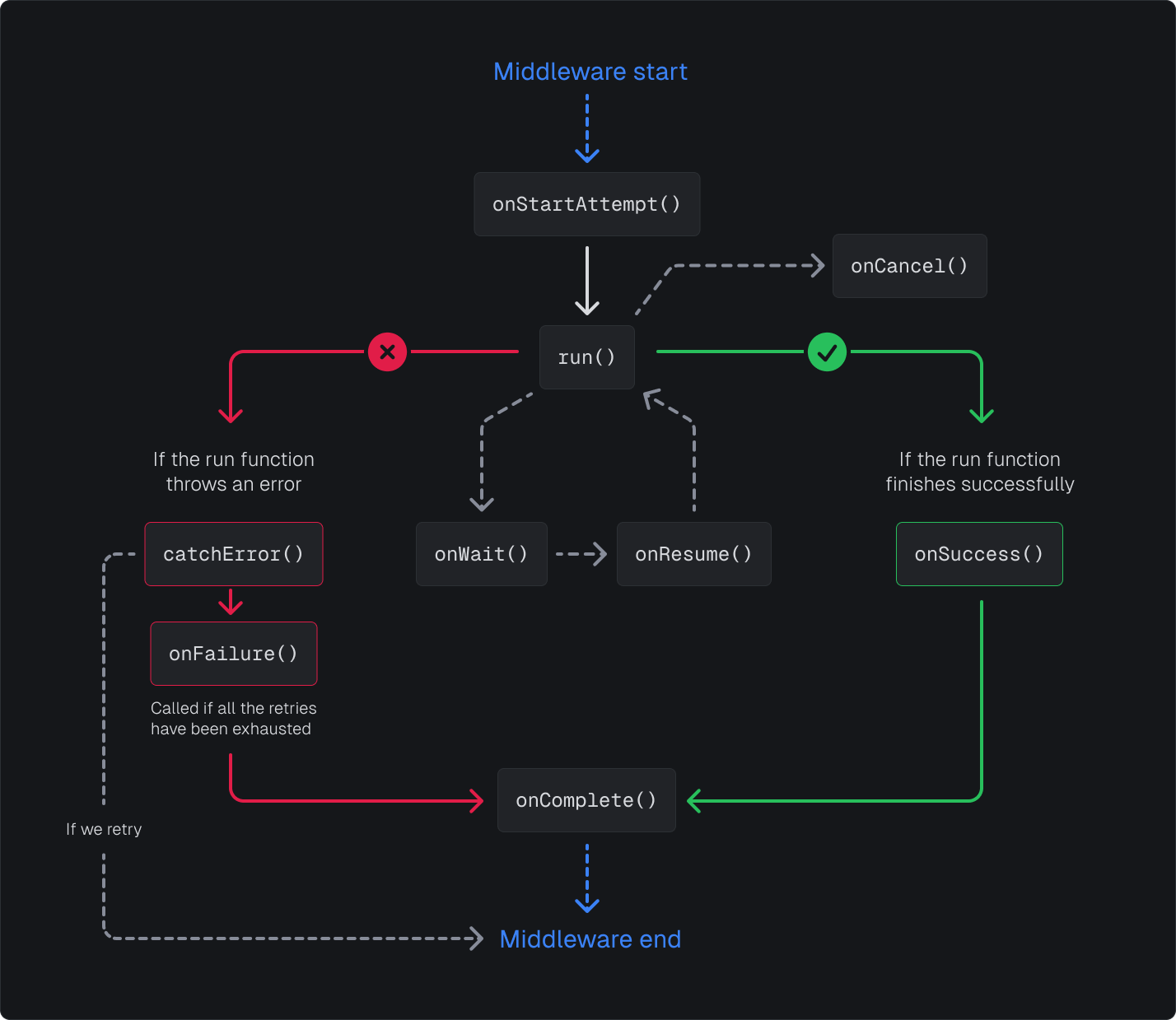
## Lifecycle functions
 ### `middleware` and `locals` functions
Our task middleware system runs at the top level, executing before and after all lifecycle hooks. This allows you to wrap the entire task execution lifecycle with custom logic.
An error thrown in `middleware` is just like an uncaught error in the run function: it will
propagate through to `catchError()` function and then will fail the attempt (either causing a
retry or failing the run).
The `locals` API allows you to share data between middleware and hooks.
```ts db.ts theme={"theme":"css-variables"}
import { locals } from "@trigger.dev/sdk";
import { logger, tasks } from "@trigger.dev/sdk";
// This would be type of your database client here
const DbLocal = locals.create<{ connect: () => Promise; disconnect: () => Promise }>(
"db"
);
export function getDb() {
return locals.getOrThrow(DbLocal);
}
export function setDb(db: { connect: () => Promise }) {
locals.set(DbLocal, db);
}
tasks.middleware("db", async ({ ctx, payload, next, task }) => {
// This would be your database client here
const db = locals.set(DbLocal, {
connect: async () => {
logger.info("Connecting to the database");
},
disconnect: async () => {
logger.info("Disconnecting from the database");
},
});
await db.connect();
await next();
await db.disconnect();
});
// Disconnect when the run is paused
tasks.onWait("db", async ({ ctx, payload, task }) => {
const db = getDb();
await db.disconnect();
});
// Reconnect when the run is resumed
tasks.onResume("db", async ({ ctx, payload, task }) => {
const db = getDb();
await db.connect();
});
```
You can access the database client using `getDb()` in your tasks `run` function and all your hooks (global or task specific):
```typescript theme={"theme":"css-variables"}
import { getDb } from "./db";
export const myTask = task({
run: async (payload: any, { ctx }) => {
const db = getDb();
await db.query("SELECT 1");
},
});
```
#### Per-task middleware
You can also define middleware per task by passing the `middleware` option in the task definition. This runs after global middleware and before the `run` function. Use it when only specific tasks need certain locals or setup:
```typescript theme={"theme":"css-variables"}
import { task, locals } from "@trigger.dev/sdk";
const myLocal = locals.create("myLocal");
export const myTask = task({
id: "my-task",
middleware: async ({ payload, ctx, next }) => {
locals.set(myLocal, "some-value");
await next();
},
run: async (payload) => {
const value = locals.getOrThrow(myLocal);
// ...
},
});
```
### `onStartAttempt` function
The `onStartAttempt` function was introduced in v4.1.0
Before a task run attempt starts, the `onStartAttempt` function is called. It's useful for sending notifications, logging, and other side effects.
```ts /trigger/on-start.ts theme={"theme":"css-variables"}
export const taskWithOnStartAttempt = task({
id: "task-with-on-start-attempt",
onStartAttempt: async ({ payload, ctx }) => {
//...
},
run: async (payload: any, { ctx }) => {
//...
},
});
```
You can also define a global `onStartAttempt` function using `tasks.onStartAttempt()`.
```ts init.ts theme={"theme":"css-variables"}
import { tasks } from "@trigger.dev/sdk";
tasks.onStartAttempt(({ ctx, payload, task }) => {
console.log(
`Run ${ctx.run.id} started on task ${task} attempt ${ctx.run.attempt.number}`,
ctx.run
);
});
```
Errors thrown in the `onStartAttempt` function will cause the attempt to fail.
If you want to execute code before just the first attempt, you can use the `onStartAttempt` function and check `ctx.run.attempt.number === 1`:
```ts /trigger/on-start-attempt.ts theme={"theme":"css-variables"}
export const taskWithOnStartAttempt = task({
id: "task-with-on-start-attempt",
onStartAttempt: async ({ payload, ctx }) => {
if (ctx.run.attempt.number === 1) {
console.log("Run started on attempt 1", ctx.run);
}
},
});
```
### `onWait` and `onResume` functions
These lifecycle hooks allow you to run code when a run is paused or resumed because of a wait:
```typescript theme={"theme":"css-variables"}
export const myTask = task({
id: "my-task",
onWait: async ({ wait }) => {
console.log("Run paused", wait);
},
onResume: async ({ wait }) => {
console.log("Run resumed", wait);
},
run: async (payload: any, { ctx }) => {
console.log("Run started", ctx.run);
await wait.for({ seconds: 10 });
console.log("Run finished", ctx.run);
},
});
```
You can also define global `onWait` and `onResume` functions using `tasks.onWait()` and `tasks.onResume()`:
```ts init.ts theme={"theme":"css-variables"}
import { tasks } from "@trigger.dev/sdk";
tasks.onWait(({ ctx, payload, wait, task }) => {
console.log("Run paused", ctx.run, wait);
});
tasks.onResume(({ ctx, payload, wait, task }) => {
console.log("Run resumed", ctx.run, wait);
});
```
### `onSuccess` function
When a task run succeeds, the `onSuccess` function is called. It's useful for sending notifications, logging, syncing state to your database, or other side effects.
```ts /trigger/on-success.ts theme={"theme":"css-variables"}
export const taskWithOnSuccess = task({
id: "task-with-on-success",
onSuccess: async ({ payload, output, ctx }) => {
//...
},
run: async (payload: any, { ctx }) => {
//...
},
});
```
You can also define a global `onSuccess` function using `tasks.onSuccess()`.
```ts init.ts theme={"theme":"css-variables"}
import { tasks } from "@trigger.dev/sdk";
tasks.onSuccess(({ ctx, payload, output }) => {
console.log("Task succeeded", ctx.task.id);
});
```
Errors thrown in the `onSuccess` function will be ignored, but you will still be able to see them
in the dashboard.
### `onComplete` function
This hook is executed when a run completes, regardless of whether it succeeded or failed:
```ts /trigger/on-complete.ts theme={"theme":"css-variables"}
export const taskWithOnComplete = task({
id: "task-with-on-complete",
onComplete: async ({ payload, output, ctx }) => {
if (result.ok) {
console.log("Run succeeded", result.data);
} else {
console.log("Run failed", result.error);
}
});
```
You can also define a global `onComplete` function using `tasks.onComplete()`.
```ts init.ts theme={"theme":"css-variables"}
import { tasks } from "@trigger.dev/sdk";
tasks.onComplete(({ ctx, payload, output }) => {
console.log("Task completed", ctx.task.id);
});
```
Errors thrown in the `onComplete` function will be ignored, but you will still be able to see them
in the dashboard.
### `onFailure` function
When a task run fails, the `onFailure` function is called. It's useful for sending notifications, logging, or other side effects. It will only be executed once the task run has exhausted all its retries.
```ts /trigger/on-failure.ts theme={"theme":"css-variables"}
export const taskWithOnFailure = task({
id: "task-with-on-failure",
onFailure: async ({ payload, error, ctx }) => {
//...
},
run: async (payload: any, { ctx }) => {
//...
},
});
```
You can also define a global `onFailure` function using `tasks.onFailure()`.
```ts init.ts theme={"theme":"css-variables"}
import { tasks } from "@trigger.dev/sdk";
tasks.onFailure(({ ctx, payload, error }) => {
console.log("Task failed", ctx.task.id);
});
```
Errors thrown in the `onFailure` function will be ignored, but you will still be able to see them
in the dashboard.
`onFailure` doesn’t fire for some of the run statuses like `Crashed`, `System failures`, and
`Canceled`.
### `catchError` functions
You can define a function that will be called when an error is thrown in the `run` function, that allows you to control how the error is handled and whether the task should be retried.
Read more about `catchError` in our [Errors and Retrying guide](/errors-retrying).
Uncaught errors will throw a special internal error of the type `HANDLE_ERROR_ERROR`.
### `onCancel` function
You can define an `onCancel` hook that is called when a run is cancelled. This is useful if you want to clean up any resources that were allocated for the run.
```typescript theme={"theme":"css-variables"}
tasks.onCancel(({ ctx, signal }) => {
console.log("Run cancelled", signal);
});
```
You can use the `onCancel` hook along with the `signal` passed into the run function to interrupt a call to an external service, for example using the [streamText](https://ai-sdk.dev/docs/reference/ai-sdk-core/stream-text) function from the AI SDK:
```typescript theme={"theme":"css-variables"}
import { logger, tasks, schemaTask } from "@trigger.dev/sdk";
import { streamText } from "ai";
import { z } from "zod";
export const interruptibleChat = schemaTask({
id: "interruptible-chat",
description: "Chat with the AI",
schema: z.object({
prompt: z.string().describe("The prompt to chat with the AI"),
}),
run: async ({ prompt }, { signal }) => {
const chunks: TextStreamPart<{}>[] = [];
// 👇 This is a global onCancel hook, but it's inside of the run function
tasks.onCancel(async () => {
// We have access to the chunks here, and can save them to the database
await saveChunksToDatabase(chunks);
});
try {
const result = streamText({
model: getModel(),
prompt,
experimental_telemetry: {
isEnabled: true,
},
tools: {},
abortSignal: signal, // 👈 Pass the signal to the streamText function, which aborts with the run is cancelled
onChunk: ({ chunk }) => {
chunks.push(chunk);
},
});
const textParts = [];
for await (const part of result.textStream) {
textParts.push(part);
}
return textParts.join("");
} catch (error) {
if (error instanceof Error && error.name === "AbortError") {
// streamText will throw an AbortError if the signal is aborted, so we can handle it here
} else {
throw error;
}
}
},
});
```
The `onCancel` hook can optionally wait for the `run` function to finish, and access the output of the run:
```typescript theme={"theme":"css-variables"}
import { logger, task } from "@trigger.dev/sdk";
import { setTimeout } from "node:timers/promises";
export const cancelExampleTask = task({
id: "cancel-example",
// Signal will be aborted when the task is cancelled 👇
run: async (payload: { message: string }, { signal }) => {
try {
// We pass the signal to setTimeout to abort the timeout if the task is cancelled
await setTimeout(10_000, undefined, { signal });
} catch (error) {
// Ignore the abort error
}
// Do some more work here
return {
message: "Hello, world!",
};
},
onCancel: async ({ runPromise }) => {
// You can await the runPromise to get the output of the task
const output = await runPromise;
},
});
```
You will have up to 30 seconds to complete the `runPromise` in the `onCancel` hook. After that
point the process will be killed.
`onCancel` only runs if the run is actively executing. If a run is cancelled while queued or
suspended (e.g. waiting for a token), no machine is spun up and `onCancel` will not be called.
This is a known limitation we're planning to address. Follow the progress on our [feedback
board](https://feedback.trigger.dev/p/call-the-onfailure-hook-for-runs-that-were-canceled-expired).
### `onStart` function (deprecated)
The `onStart` function was deprecated in v4.1.0. Use `onStartAttempt` instead.
When a task run starts, the `onStart` function is called. It's useful for sending notifications, logging, and other side effects.
This function will only be called once per run (not per attempt). If you want to run code before
each attempt, use a middleware function or the `onStartAttempt` function.
```ts /trigger/on-start.ts theme={"theme":"css-variables"}
export const taskWithOnStart = task({
id: "task-with-on-start",
onStart: async ({ payload, ctx }) => {
//...
},
run: async (payload: any, { ctx }) => {
//...
},
});
```
You can also define a global `onStart` function using `tasks.onStart()`.
```ts init.ts theme={"theme":"css-variables"}
import { tasks } from "@trigger.dev/sdk";
tasks.onStart(({ ctx, payload, task }) => {
console.log(`Run ${ctx.run.id} started on task ${task}`, ctx.run);
});
```
Errors thrown in the `onStart` function will cause the attempt to fail.
### `init` function (deprecated)
The `init` hook is deprecated and will be removed in the future. Use
[middleware](/tasks/overview#middleware-and-locals-functions) instead.
This function is called before a run attempt:
```ts /trigger/init.ts theme={"theme":"css-variables"}
export const taskWithInit = task({
id: "task-with-init",
init: async ({ payload, ctx }) => {
//...
},
run: async (payload: any, { ctx }) => {
//...
},
});
```
You can also return data from the `init` function that will be available in the params of the `run`, `cleanup`, `onSuccess`, and `onFailure` functions.
```ts /trigger/init-return.ts theme={"theme":"css-variables"}
export const taskWithInitReturn = task({
id: "task-with-init-return",
init: async ({ payload, ctx }) => {
return { someData: "someValue" };
},
run: async (payload: any, { ctx, init }) => {
console.log(init.someData); // "someValue"
},
});
```
Errors thrown in the `init` function will cause the attempt to fail.
### `cleanup` function (deprecated)
The `cleanup` hook is deprecated and will be removed in the future. Use
[middleware](/tasks/overview#middleware-and-locals-functions) instead.
This function is called after the `run` function is executed, regardless of whether the run was successful or not. It's useful for cleaning up resources, logging, or other side effects.
```ts /trigger/cleanup.ts theme={"theme":"css-variables"}
export const taskWithCleanup = task({
id: "task-with-cleanup",
cleanup: async ({ payload, ctx }) => {
//...
},
run: async (payload: any, { ctx }) => {
//...
},
});
```
Errors thrown in the `cleanup` function will cause the attempt to fail.
## Next steps
Learn how to trigger your tasks from your code.
Tasks are the core of Trigger.dev. Learn how to write them.
### `middleware` and `locals` functions
Our task middleware system runs at the top level, executing before and after all lifecycle hooks. This allows you to wrap the entire task execution lifecycle with custom logic.
An error thrown in `middleware` is just like an uncaught error in the run function: it will
propagate through to `catchError()` function and then will fail the attempt (either causing a
retry or failing the run).
The `locals` API allows you to share data between middleware and hooks.
```ts db.ts theme={"theme":"css-variables"}
import { locals } from "@trigger.dev/sdk";
import { logger, tasks } from "@trigger.dev/sdk";
// This would be type of your database client here
const DbLocal = locals.create<{ connect: () => Promise; disconnect: () => Promise }>(
"db"
);
export function getDb() {
return locals.getOrThrow(DbLocal);
}
export function setDb(db: { connect: () => Promise }) {
locals.set(DbLocal, db);
}
tasks.middleware("db", async ({ ctx, payload, next, task }) => {
// This would be your database client here
const db = locals.set(DbLocal, {
connect: async () => {
logger.info("Connecting to the database");
},
disconnect: async () => {
logger.info("Disconnecting from the database");
},
});
await db.connect();
await next();
await db.disconnect();
});
// Disconnect when the run is paused
tasks.onWait("db", async ({ ctx, payload, task }) => {
const db = getDb();
await db.disconnect();
});
// Reconnect when the run is resumed
tasks.onResume("db", async ({ ctx, payload, task }) => {
const db = getDb();
await db.connect();
});
```
You can access the database client using `getDb()` in your tasks `run` function and all your hooks (global or task specific):
```typescript theme={"theme":"css-variables"}
import { getDb } from "./db";
export const myTask = task({
run: async (payload: any, { ctx }) => {
const db = getDb();
await db.query("SELECT 1");
},
});
```
#### Per-task middleware
You can also define middleware per task by passing the `middleware` option in the task definition. This runs after global middleware and before the `run` function. Use it when only specific tasks need certain locals or setup:
```typescript theme={"theme":"css-variables"}
import { task, locals } from "@trigger.dev/sdk";
const myLocal = locals.create("myLocal");
export const myTask = task({
id: "my-task",
middleware: async ({ payload, ctx, next }) => {
locals.set(myLocal, "some-value");
await next();
},
run: async (payload) => {
const value = locals.getOrThrow(myLocal);
// ...
},
});
```
### `onStartAttempt` function
The `onStartAttempt` function was introduced in v4.1.0
Before a task run attempt starts, the `onStartAttempt` function is called. It's useful for sending notifications, logging, and other side effects.
```ts /trigger/on-start.ts theme={"theme":"css-variables"}
export const taskWithOnStartAttempt = task({
id: "task-with-on-start-attempt",
onStartAttempt: async ({ payload, ctx }) => {
//...
},
run: async (payload: any, { ctx }) => {
//...
},
});
```
You can also define a global `onStartAttempt` function using `tasks.onStartAttempt()`.
```ts init.ts theme={"theme":"css-variables"}
import { tasks } from "@trigger.dev/sdk";
tasks.onStartAttempt(({ ctx, payload, task }) => {
console.log(
`Run ${ctx.run.id} started on task ${task} attempt ${ctx.run.attempt.number}`,
ctx.run
);
});
```
Errors thrown in the `onStartAttempt` function will cause the attempt to fail.
If you want to execute code before just the first attempt, you can use the `onStartAttempt` function and check `ctx.run.attempt.number === 1`:
```ts /trigger/on-start-attempt.ts theme={"theme":"css-variables"}
export const taskWithOnStartAttempt = task({
id: "task-with-on-start-attempt",
onStartAttempt: async ({ payload, ctx }) => {
if (ctx.run.attempt.number === 1) {
console.log("Run started on attempt 1", ctx.run);
}
},
});
```
### `onWait` and `onResume` functions
These lifecycle hooks allow you to run code when a run is paused or resumed because of a wait:
```typescript theme={"theme":"css-variables"}
export const myTask = task({
id: "my-task",
onWait: async ({ wait }) => {
console.log("Run paused", wait);
},
onResume: async ({ wait }) => {
console.log("Run resumed", wait);
},
run: async (payload: any, { ctx }) => {
console.log("Run started", ctx.run);
await wait.for({ seconds: 10 });
console.log("Run finished", ctx.run);
},
});
```
You can also define global `onWait` and `onResume` functions using `tasks.onWait()` and `tasks.onResume()`:
```ts init.ts theme={"theme":"css-variables"}
import { tasks } from "@trigger.dev/sdk";
tasks.onWait(({ ctx, payload, wait, task }) => {
console.log("Run paused", ctx.run, wait);
});
tasks.onResume(({ ctx, payload, wait, task }) => {
console.log("Run resumed", ctx.run, wait);
});
```
### `onSuccess` function
When a task run succeeds, the `onSuccess` function is called. It's useful for sending notifications, logging, syncing state to your database, or other side effects.
```ts /trigger/on-success.ts theme={"theme":"css-variables"}
export const taskWithOnSuccess = task({
id: "task-with-on-success",
onSuccess: async ({ payload, output, ctx }) => {
//...
},
run: async (payload: any, { ctx }) => {
//...
},
});
```
You can also define a global `onSuccess` function using `tasks.onSuccess()`.
```ts init.ts theme={"theme":"css-variables"}
import { tasks } from "@trigger.dev/sdk";
tasks.onSuccess(({ ctx, payload, output }) => {
console.log("Task succeeded", ctx.task.id);
});
```
Errors thrown in the `onSuccess` function will be ignored, but you will still be able to see them
in the dashboard.
### `onComplete` function
This hook is executed when a run completes, regardless of whether it succeeded or failed:
```ts /trigger/on-complete.ts theme={"theme":"css-variables"}
export const taskWithOnComplete = task({
id: "task-with-on-complete",
onComplete: async ({ payload, output, ctx }) => {
if (result.ok) {
console.log("Run succeeded", result.data);
} else {
console.log("Run failed", result.error);
}
});
```
You can also define a global `onComplete` function using `tasks.onComplete()`.
```ts init.ts theme={"theme":"css-variables"}
import { tasks } from "@trigger.dev/sdk";
tasks.onComplete(({ ctx, payload, output }) => {
console.log("Task completed", ctx.task.id);
});
```
Errors thrown in the `onComplete` function will be ignored, but you will still be able to see them
in the dashboard.
### `onFailure` function
When a task run fails, the `onFailure` function is called. It's useful for sending notifications, logging, or other side effects. It will only be executed once the task run has exhausted all its retries.
```ts /trigger/on-failure.ts theme={"theme":"css-variables"}
export const taskWithOnFailure = task({
id: "task-with-on-failure",
onFailure: async ({ payload, error, ctx }) => {
//...
},
run: async (payload: any, { ctx }) => {
//...
},
});
```
You can also define a global `onFailure` function using `tasks.onFailure()`.
```ts init.ts theme={"theme":"css-variables"}
import { tasks } from "@trigger.dev/sdk";
tasks.onFailure(({ ctx, payload, error }) => {
console.log("Task failed", ctx.task.id);
});
```
Errors thrown in the `onFailure` function will be ignored, but you will still be able to see them
in the dashboard.
`onFailure` doesn’t fire for some of the run statuses like `Crashed`, `System failures`, and
`Canceled`.
### `catchError` functions
You can define a function that will be called when an error is thrown in the `run` function, that allows you to control how the error is handled and whether the task should be retried.
Read more about `catchError` in our [Errors and Retrying guide](/errors-retrying).
Uncaught errors will throw a special internal error of the type `HANDLE_ERROR_ERROR`.
### `onCancel` function
You can define an `onCancel` hook that is called when a run is cancelled. This is useful if you want to clean up any resources that were allocated for the run.
```typescript theme={"theme":"css-variables"}
tasks.onCancel(({ ctx, signal }) => {
console.log("Run cancelled", signal);
});
```
You can use the `onCancel` hook along with the `signal` passed into the run function to interrupt a call to an external service, for example using the [streamText](https://ai-sdk.dev/docs/reference/ai-sdk-core/stream-text) function from the AI SDK:
```typescript theme={"theme":"css-variables"}
import { logger, tasks, schemaTask } from "@trigger.dev/sdk";
import { streamText } from "ai";
import { z } from "zod";
export const interruptibleChat = schemaTask({
id: "interruptible-chat",
description: "Chat with the AI",
schema: z.object({
prompt: z.string().describe("The prompt to chat with the AI"),
}),
run: async ({ prompt }, { signal }) => {
const chunks: TextStreamPart<{}>[] = [];
// 👇 This is a global onCancel hook, but it's inside of the run function
tasks.onCancel(async () => {
// We have access to the chunks here, and can save them to the database
await saveChunksToDatabase(chunks);
});
try {
const result = streamText({
model: getModel(),
prompt,
experimental_telemetry: {
isEnabled: true,
},
tools: {},
abortSignal: signal, // 👈 Pass the signal to the streamText function, which aborts with the run is cancelled
onChunk: ({ chunk }) => {
chunks.push(chunk);
},
});
const textParts = [];
for await (const part of result.textStream) {
textParts.push(part);
}
return textParts.join("");
} catch (error) {
if (error instanceof Error && error.name === "AbortError") {
// streamText will throw an AbortError if the signal is aborted, so we can handle it here
} else {
throw error;
}
}
},
});
```
The `onCancel` hook can optionally wait for the `run` function to finish, and access the output of the run:
```typescript theme={"theme":"css-variables"}
import { logger, task } from "@trigger.dev/sdk";
import { setTimeout } from "node:timers/promises";
export const cancelExampleTask = task({
id: "cancel-example",
// Signal will be aborted when the task is cancelled 👇
run: async (payload: { message: string }, { signal }) => {
try {
// We pass the signal to setTimeout to abort the timeout if the task is cancelled
await setTimeout(10_000, undefined, { signal });
} catch (error) {
// Ignore the abort error
}
// Do some more work here
return {
message: "Hello, world!",
};
},
onCancel: async ({ runPromise }) => {
// You can await the runPromise to get the output of the task
const output = await runPromise;
},
});
```
You will have up to 30 seconds to complete the `runPromise` in the `onCancel` hook. After that
point the process will be killed.
`onCancel` only runs if the run is actively executing. If a run is cancelled while queued or
suspended (e.g. waiting for a token), no machine is spun up and `onCancel` will not be called.
This is a known limitation we're planning to address. Follow the progress on our [feedback
board](https://feedback.trigger.dev/p/call-the-onfailure-hook-for-runs-that-were-canceled-expired).
### `onStart` function (deprecated)
The `onStart` function was deprecated in v4.1.0. Use `onStartAttempt` instead.
When a task run starts, the `onStart` function is called. It's useful for sending notifications, logging, and other side effects.
This function will only be called once per run (not per attempt). If you want to run code before
each attempt, use a middleware function or the `onStartAttempt` function.
```ts /trigger/on-start.ts theme={"theme":"css-variables"}
export const taskWithOnStart = task({
id: "task-with-on-start",
onStart: async ({ payload, ctx }) => {
//...
},
run: async (payload: any, { ctx }) => {
//...
},
});
```
You can also define a global `onStart` function using `tasks.onStart()`.
```ts init.ts theme={"theme":"css-variables"}
import { tasks } from "@trigger.dev/sdk";
tasks.onStart(({ ctx, payload, task }) => {
console.log(`Run ${ctx.run.id} started on task ${task}`, ctx.run);
});
```
Errors thrown in the `onStart` function will cause the attempt to fail.
### `init` function (deprecated)
The `init` hook is deprecated and will be removed in the future. Use
[middleware](/tasks/overview#middleware-and-locals-functions) instead.
This function is called before a run attempt:
```ts /trigger/init.ts theme={"theme":"css-variables"}
export const taskWithInit = task({
id: "task-with-init",
init: async ({ payload, ctx }) => {
//...
},
run: async (payload: any, { ctx }) => {
//...
},
});
```
You can also return data from the `init` function that will be available in the params of the `run`, `cleanup`, `onSuccess`, and `onFailure` functions.
```ts /trigger/init-return.ts theme={"theme":"css-variables"}
export const taskWithInitReturn = task({
id: "task-with-init-return",
init: async ({ payload, ctx }) => {
return { someData: "someValue" };
},
run: async (payload: any, { ctx, init }) => {
console.log(init.someData); // "someValue"
},
});
```
Errors thrown in the `init` function will cause the attempt to fail.
### `cleanup` function (deprecated)
The `cleanup` hook is deprecated and will be removed in the future. Use
[middleware](/tasks/overview#middleware-and-locals-functions) instead.
This function is called after the `run` function is executed, regardless of whether the run was successful or not. It's useful for cleaning up resources, logging, or other side effects.
```ts /trigger/cleanup.ts theme={"theme":"css-variables"}
export const taskWithCleanup = task({
id: "task-with-cleanup",
cleanup: async ({ payload, ctx }) => {
//...
},
run: async (payload: any, { ctx }) => {
//...
},
});
```
Errors thrown in the `cleanup` function will cause the attempt to fail.
## Next steps
Learn how to trigger your tasks from your code.
Tasks are the core of Trigger.dev. Learn how to write them.