> ## Documentation Index
> Fetch the complete documentation index at: https://trigger.dev/docs/llms.txt
> Use this file to discover all available pages before exploring further.
# Prisma
> Use the prismaExtension build extension to use Prisma with Trigger.dev
The `prismaExtension` supports multiple Prisma versions and deployment strategies through **three distinct modes** that handle the evolving Prisma ecosystem, from legacy setups to Prisma 7.
The `prismaExtension` requires an explicit `mode` parameter. All configurations must specify a
mode.
## Migration from previous versions
### Before (pre 4.1.1)
```ts theme={"theme":"css-variables"}
import { prismaExtension } from "@trigger.dev/build/extensions/prisma";
extensions: [
prismaExtension({
schema: "prisma/schema.prisma",
migrate: true,
typedSql: true,
directUrlEnvVarName: "DATABASE_URL_UNPOOLED",
}),
];
```
### After (4.1.1+)
```ts theme={"theme":"css-variables"}
import { prismaExtension } from "@trigger.dev/build/extensions/prisma";
extensions: [
prismaExtension({
mode: "legacy", // MODE IS REQUIRED
schema: "prisma/schema.prisma",
migrate: true,
typedSql: true,
directUrlEnvVarName: "DATABASE_URL_UNPOOLED",
}),
];
```
## Choosing the right mode
Use this decision tree to determine which mode is right for your project:
```mermaid theme={"theme":"css-variables"}
flowchart TD
Start([Which mode should I use?]) --> Q1{Using Prisma 7 or
6.20+ beta?}
Q1 -->|Yes| Modern[Modern Mode]
Q1 -->|No| Q2{Using Prisma 6.16+
with engineType='client'?}
Q2 -->|Yes| Modern
Q2 -->|No| Q3{Need custom client
output path?}
Q3 -->|Yes| Q4{Want to manage
prisma generate yourself?}
Q4 -->|Yes| Engine[Engine-only Mode]
Q4 -->|No| Legacy[Legacy Mode]
Q3 -->|No| Legacy
Modern -->|Features| ModernFeatures["• Zero configuration
• Database adapters
• Plain TypeScript (no binaries)
• You manage generation"]
Engine -->|Features| EngineFeatures["• Only installs engines
• Auto version detection
• You manage generation
• Minimal overhead"]
Legacy -->|Features| LegacyFeatures["• Auto prisma generate
• Migrations support
• TypedSQL support
• Config file support"]
style Modern fill:#10b981,stroke:#059669,color:#fff
style Engine fill:#3b82f6,stroke:#2563eb,color:#fff
style Legacy fill:#8b5cf6,stroke:#7c3aed,color:#fff
```
## Extension modes
### Legacy mode
**Use when:** You're using Prisma 6.x or earlier with the `prisma-client-js` provider.
**Features:**
* Automatic `prisma generate` during deployment
* Supports single-file schemas (`prisma/schema.prisma`)
* Supports multi-file schemas (Prisma 6.7+, directory-based schemas)
* Supports Prisma config files (`prisma.config.ts`) via `@prisma/config` package
* Migration support with `migrate: true`
* TypedSQL support with `typedSql: true`
* Custom generator selection
* Handles Prisma client versioning automatically (with filesystem fallback detection)
* Automatic extraction of schema and migrations paths from config files
**Schema configuration:**
```prisma theme={"theme":"css-variables"}
generator client {
provider = "prisma-client-js"
previewFeatures = ["typedSql"]
}
datasource db {
provider = "postgresql"
url = env("DATABASE_URL")
directUrl = env("DATABASE_URL_UNPOOLED")
}
```
**Extension configuration:**
```ts theme={"theme":"css-variables"}
// Single-file schema
prismaExtension({
mode: "legacy",
schema: "prisma/schema.prisma",
migrate: true,
typedSql: true,
directUrlEnvVarName: "DATABASE_URL_UNPOOLED",
});
// Multi-file schema (Prisma 6.7+)
prismaExtension({
mode: "legacy",
schema: "./prisma", // Point to directory
migrate: true,
typedSql: true,
directUrlEnvVarName: "DATABASE_URL_UNPOOLED",
});
```
**Tested versions:**
* Prisma 6.14.0
* Prisma 6.7.0+ (multi-file schema support)
* Prisma 5.x
***
### Engine-only mode
**Use when:** You have a custom Prisma client output path and want to manage `prisma generate` yourself.
**Features:**
* Only installs Prisma engine binaries (no client generation)
* Automatic version detection from `@prisma/client`
* Manual override of version and binary target
* Minimal overhead - just ensures engines are available
* You control when and how `prisma generate` runs
**Schema configuration:**
```prisma theme={"theme":"css-variables"}
generator client {
provider = "prisma-client-js"
output = "../src/generated/prisma"
// Ensure the "debian-openssl-3.0.x" binary target is included for deployment to the trigger.dev cloud
binaryTargets = ["native", "debian-openssl-3.0.x"]
}
datasource db {
provider = "postgresql"
url = env("DATABASE_URL")
directUrl = env("DATABASE_URL_UNPOOLED")
}
```
**Extension configuration:**
```ts theme={"theme":"css-variables"}
// Auto-detect version
prismaExtension({
mode: "engine-only",
});
// Explicit version (recommended for reproducible builds)
prismaExtension({
mode: "engine-only",
version: "6.19.0",
});
```
**Important notes:**
* You **must** run `prisma generate` yourself (typically in a prebuild script)
* Your schema **must** include the correct `binaryTargets` for deployment to the trigger.dev cloud. The binary target is `debian-openssl-3.0.x`.
* The extension sets `PRISMA_QUERY_ENGINE_LIBRARY` and `PRISMA_QUERY_ENGINE_SCHEMA_ENGINE` environment variables to the correct paths for the binary targets.
**package.json example:**
```json theme={"theme":"css-variables"}
{
"scripts": {
"prebuild": "prisma generate",
"dev": "trigger dev",
"deploy": "trigger deploy"
}
}
```
**Tested versions:**
* Prisma 6.19.0
* Prisma 6.16.0+
***
### Modern mode
**Use when:** You're using Prisma 6.16+ with the new `prisma-client` provider (with `engineType = "client"`) or preparing for Prisma 7.
**Features:**
* Designed for the new Prisma architecture
* Zero configuration required
* Automatically marks `@prisma/client` as external
* Works with Prisma 7 beta releases & Prisma 7 when released
* You manage client generation (like engine-only mode)
**Schema configuration (Prisma 6.16+ with engineType):**
```prisma theme={"theme":"css-variables"}
generator client {
provider = "prisma-client"
output = "../src/generated/prisma"
engineType = "client"
previewFeatures = ["views"]
}
datasource db {
provider = "postgresql"
url = env("DATABASE_URL")
directUrl = env("DATABASE_URL_UNPOOLED")
}
```
**Schema configuration (Prisma 7):**
```prisma theme={"theme":"css-variables"}
generator client {
provider = "prisma-client"
output = "../src/generated/prisma"
}
datasource db {
provider = "postgresql"
}
```
**Extension configuration:**
```ts theme={"theme":"css-variables"}
prismaExtension({
mode: "modern",
});
```
**Prisma config (Prisma 7):**
```ts theme={"theme":"css-variables"}
// prisma.config.ts
import { defineConfig, env } from "prisma/config";
import "dotenv/config";
export default defineConfig({
schema: "prisma/schema.prisma",
migrations: {
path: "prisma/migrations",
},
datasource: {
url: env("DATABASE_URL"),
},
});
```
**Important notes:**
* You **must** run `prisma generate` yourself.
* Requires Prisma 6.16.0+ or Prisma 7 beta
* The new `prisma-client` provider generates plain TypeScript (no Rust binaries)
* Requires database adapters (e.g., `@prisma/adapter-pg` for PostgreSQL)
**Tested versions:**
* Prisma 6.16.0 with `engineType = "client"`
* Prisma 6.20.0-integration-next.8 (Prisma 7 beta)
***
## Migration guide
### From old prismaExtension to legacy mode
If you were using the previous `prismaExtension`, migrate to legacy mode:
```ts theme={"theme":"css-variables"}
// Old
prismaExtension({
schema: "prisma/schema.prisma",
migrate: true,
});
// New - add mode
prismaExtension({
mode: "legacy",
schema: "prisma/schema.prisma",
migrate: true,
});
```
### Preparing for Prisma 7
If you want to adopt the new Prisma architecture, use modern mode:
1. Update your schema to use `prisma-client` provider
2. Add database adapters to your dependencies
3. Configure the extension:
```ts theme={"theme":"css-variables"}
prismaExtension({
mode: "modern",
});
```
### Manage your own prisma generate step
When using `modern` and `engine-only` modes, you'll need to ensure that you run `prisma generate` yourself before deploying your project.
#### Github Actions
If you are deploying your project using GitHub Actions, you can add a step to your workflow to run `prisma generate` before deploying your project, for example:
```yaml theme={"theme":"css-variables"}
steps:
- name: Generate Prisma client
run: npx prisma@6.19.0 generate
- name: Deploy Trigger.dev
run: npx trigger.dev@4.1.1 deploy
env:
TRIGGER_ACCESS_TOKEN: ${{ secrets.TRIGGER_ACCESS_TOKEN }}
```
#### Trigger.dev Github integration
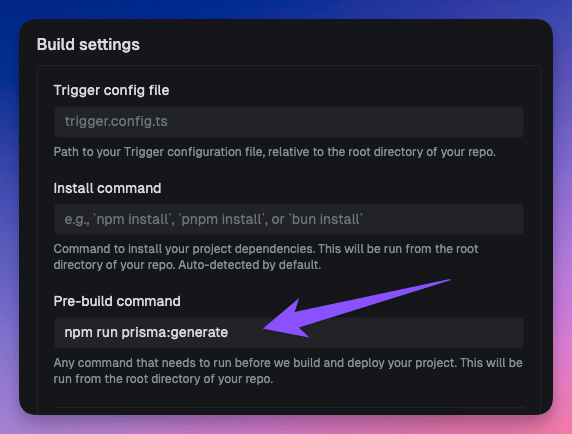
If you are using the [Trigger.dev Github integration](/github-integration), you can configure a pre-build command to run `prisma generate` before deploying your project. Navigate to your project's settings page and configure the pre-build command to run `prisma generate`, for example:
 ***
## Version compatibility matrix
| Prisma version | Recommended mode | Notes |
| ---------------- | --------------------- | -------------------------------------------- |
| \< 5.0 | Legacy | Older Prisma versions |
| 5.0 - 6.15 | Legacy | Standard Prisma setup |
| 6.7+ | Legacy | Multi-file schema support |
| 6.16+ | Engine-only or Modern | Modern mode requires `engineType = "client"` |
| 6.20+ (7.0 beta) | Modern | Prisma 7 with new architecture |
***
## Prisma config file support
Legacy mode supports loading configuration from a `prisma.config.ts` file using the official `@prisma/config` package.
**Use when:** You want to use Prisma's new config file format (Prisma 6+) to centralize your Prisma configuration.
**Benefits:**
* Single source of truth for Prisma configuration
* Automatic extraction of schema location and migrations path
* Type-safe configuration with TypeScript
* Works seamlessly with Prisma 7's config-first approach
**prisma.config.ts:**
```ts theme={"theme":"css-variables"}
import { defineConfig, env } from "prisma/config";
import "dotenv/config";
export default defineConfig({
schema: "prisma/schema.prisma",
migrations: {
path: "prisma/migrations",
},
datasource: {
url: env("DATABASE_URL"),
directUrl: env("DATABASE_URL_UNPOOLED"),
},
});
```
**trigger.config.ts:**
```ts theme={"theme":"css-variables"}
import { prismaExtension } from "@trigger.dev/build/extensions/prisma";
prismaExtension({
mode: "legacy",
configFile: "./prisma.config.ts", // Use config file instead of schema
migrate: true,
directUrlEnvVarName: "DATABASE_URL_UNPOOLED", // For migrations
});
```
**What gets extracted:**
* `schema` - The schema file or directory path
* `migrations.path` - The migrations directory path (if specified)
**Note:** Either `schema` or `configFile` must be specified, but not both.
**When to use which:**
| Use `schema` option | Use `configFile` option |
| ---------------------------- | --------------------------------- |
| Standard Prisma setup | Using Prisma 6+ with config files |
| Single or multi-file schemas | Preparing for Prisma 7 |
| No `prisma.config.ts` file | Centralized configuration needed |
| Simple setup | Want migrations path in config |
***
## Multi-file schema support
Prisma 6.7 introduced support for splitting your schema across multiple files in a directory structure.
**Example structure:**
```
prisma/
├── schema.prisma (main file with generator/datasource)
├── models/
│ ├── users.prisma
│ └── posts.prisma
└── sql/
└── getUserByEmail.sql
```
**Configuration:**
```ts theme={"theme":"css-variables"}
prismaExtension({
mode: "legacy",
schema: "./prisma", // Point to directory instead of file
migrate: true,
typedSql: true,
});
```
**package.json:**
```json theme={"theme":"css-variables"}
{
"prisma": {
"schema": "./prisma"
}
}
```
***
## TypedSQL support
TypedSQL is available in legacy mode for Prisma 5.19.0+ with the `typedSql` preview feature.
**Schema configuration:**
```prisma theme={"theme":"css-variables"}
generator client {
provider = "prisma-client-js"
previewFeatures = ["typedSql"]
}
```
**Extension configuration:**
```ts theme={"theme":"css-variables"}
prismaExtension({
mode: "legacy",
schema: "prisma/schema.prisma",
typedSql: true, // Enable TypedSQL
});
```
**Usage in tasks:**
```ts theme={"theme":"css-variables"}
import { db, sql } from "./db";
const users = await db.$queryRawTyped(sql.getUserByEmail("user@example.com"));
```
***
## Database migration support
Migrations are supported in legacy mode only.
**Extension configuration:**
```ts theme={"theme":"css-variables"}
// Using schema option
prismaExtension({
mode: "legacy",
schema: "prisma/schema.prisma",
migrate: true, // Run migrations on deployment
directUrlEnvVarName: "DATABASE_URL_UNPOOLED", // For connection pooling
});
// Using configFile option
prismaExtension({
mode: "legacy",
configFile: "./prisma.config.ts", // Migrations path extracted from config
migrate: true,
});
```
**What this does:**
1. Copies `prisma/migrations/` to the build output
2. Runs `prisma migrate deploy` before generating the client
3. Uses the `directUrlEnvVarName` for unpooled connections (required for migrations)
When using `configFile`, the migrations path is automatically extracted from your `prisma.config.ts`:
```ts theme={"theme":"css-variables"}
// prisma.config.ts
export default defineConfig({
schema: "prisma/schema.prisma",
migrations: {
path: "prisma/migrations", // Automatically used by the extension
},
});
```
***
## Binary targets and deployment
### Trigger.dev Cloud
The default binary target is `debian-openssl-3.0.x` for Trigger.dev Cloud deployments.
**Legacy mode:** Handled automatically
**Engine-only mode:** Specify in schema like so:
```prisma theme={"theme":"css-variables"}
generator client {
provider = "prisma-client-js"
binaryTargets = ["native", "debian-openssl-3.0.x"]
}
```
**Modern mode:** Handled by database adapters
### Self-hosted / local deployment
For local deployments (e.g., Docker on macOS), you may need a different binary target like so:
```ts theme={"theme":"css-variables"}
prismaExtension({
mode: "engine-only",
version: "6.19.0",
binaryTarget: "linux-arm64-openssl-3.0.x", // For macOS ARM64
});
```
***
## Environment variables
### Required variables
All modes:
* `DATABASE_URL`: Your database connection string
Legacy mode with migrations:
* `DATABASE_URL_UNPOOLED` (or your custom `directUrlEnvVarName`): Direct database connection for migrations
### Auto-set variables
Engine-only mode sets:
* `PRISMA_QUERY_ENGINE_LIBRARY`: Path to the query engine
* `PRISMA_QUERY_ENGINE_SCHEMA_ENGINE`: Path to the schema engine
***
## Troubleshooting
### "Could not find Prisma schema"
**Legacy mode:** Ensure the `schema` path is correct relative to your working directory.
```ts theme={"theme":"css-variables"}
// If your project structure is:
// project/
// trigger.config.ts
// prisma/
// schema.prisma
prismaExtension({
mode: "legacy",
schema: "./prisma/schema.prisma", // Correct
// schema: "prisma/schema.prisma", // Also works
});
```
### "Could not determine @prisma/client version"
The extension includes improved version detection that tries multiple strategies:
1. Check if `@prisma/client` is imported in your code (externals)
2. Use the `version` option if specified
3. Detect from filesystem by looking for `@prisma/client` or `prisma` in `node_modules`
**Legacy mode:** The extension will automatically detect the version from your installed packages. If it still fails, specify the version explicitly:
```ts theme={"theme":"css-variables"}
prismaExtension({
mode: "legacy",
schema: "prisma/schema.prisma",
version: "6.19.0", // Add explicit version
});
```
**Engine-only mode:** Specify the version explicitly:
```ts theme={"theme":"css-variables"}
prismaExtension({
mode: "engine-only",
version: "6.19.0", // Add explicit version
});
```
### "Binary target not found"
**Engine-only mode:** Make sure your schema includes the deployment binary target:
```prisma theme={"theme":"css-variables"}
generator client {
provider = "prisma-client-js"
binaryTargets = ["native", "linux-arm64-openssl-3.0.x"]
}
```
### "Module not found: @prisma/client/sql"
**Legacy mode:** Make sure `typedSql: true` is set and you have Prisma 5.19.0+:
```ts theme={"theme":"css-variables"}
prismaExtension({
mode: "legacy",
schema: "prisma/schema.prisma",
typedSql: true, // Required for TypedSQL
});
```
### "Config file not found" or config loading errors
**Legacy mode with configFile:** Ensure the config file path is correct:
```ts theme={"theme":"css-variables"}
prismaExtension({
mode: "legacy",
configFile: "./prisma.config.ts", // Path relative to project root
migrate: true,
});
```
**Requirements:**
* The config file must exist at the specified path
* Your project must have the `prisma` package installed (Prisma 6+)
* The config file must have a default export
* The config must specify a `schema` path
**Debugging:**
Use `--log-level debug` in your `trigger deploy` command to see detailed logs:
```ts theme={"theme":"css-variables"}
npx trigger.dev@latest deploy --log-level debug
```
Then grep for `[PrismaExtension]` in your build logs to see detailed information about config loading, schema resolution, and migrations setup.
***
## Complete examples
### Example 1: Standard Prisma 6 setup (legacy mode)
**prisma/schema.prisma:**
```prisma theme={"theme":"css-variables"}
generator client {
provider = "prisma-client-js"
previewFeatures = ["typedSql"]
}
datasource db {
provider = "postgresql"
url = env("DATABASE_URL")
directUrl = env("DATABASE_URL_UNPOOLED")
}
```
**trigger.config.ts:**
```ts theme={"theme":"css-variables"}
import { defineConfig } from "@trigger.dev/sdk";
import { prismaExtension } from "@trigger.dev/build/extensions/prisma";
export default defineConfig({
project: process.env.TRIGGER_PROJECT_REF!,
build: {
extensions: [
prismaExtension({
mode: "legacy",
schema: "prisma/schema.prisma",
migrate: true,
typedSql: true,
directUrlEnvVarName: "DATABASE_URL_UNPOOLED",
}),
],
},
});
```
***
### Example 2: Multi-file schema (legacy mode)
**prisma/schema.prisma:**
```prisma theme={"theme":"css-variables"}
generator client {
provider = "prisma-client-js"
previewFeatures = ["typedSql"]
}
datasource db {
provider = "postgresql"
url = env("DATABASE_URL")
directUrl = env("DATABASE_URL_UNPOOLED")
}
```
**prisma/models/users.prisma:**
```prisma theme={"theme":"css-variables"}
model User {
id String @id @default(cuid())
email String @unique
name String?
posts Post[]
}
```
**prisma/models/posts.prisma:**
```prisma theme={"theme":"css-variables"}
model Post {
id String @id @default(cuid())
title String
content String
authorId String
author User @relation(fields: [authorId], references: [id])
}
```
**package.json:**
```json theme={"theme":"css-variables"}
{
"prisma": {
"schema": "./prisma"
}
}
```
**trigger.config.ts:**
```ts theme={"theme":"css-variables"}
prismaExtension({
mode: "legacy",
schema: "./prisma", // Directory, not file
migrate: true,
typedSql: true,
directUrlEnvVarName: "DATABASE_URL_UNPOOLED",
});
```
***
### Example 3: Using Prisma config file (legacy mode)
Use a `prisma.config.ts` file to centralize your Prisma configuration.
**prisma.config.ts:**
```ts theme={"theme":"css-variables"}
import { defineConfig, env } from "prisma/config";
import "dotenv/config";
export default defineConfig({
schema: "prisma/schema.prisma",
migrations: {
path: "prisma/migrations",
},
datasource: {
url: env("DATABASE_URL"),
directUrl: env("DATABASE_URL_UNPOOLED"),
},
});
```
**prisma/schema.prisma:**
```prisma theme={"theme":"css-variables"}
generator client {
provider = "prisma-client-js"
previewFeatures = ["typedSql"]
}
datasource db {
provider = "postgresql"
url = env("DATABASE_URL")
directUrl = env("DATABASE_URL_UNPOOLED")
}
model User {
id String @id @default(cuid())
email String @unique
name String?
}
```
**trigger.config.ts:**
```ts theme={"theme":"css-variables"}
import { defineConfig } from "@trigger.dev/sdk";
import { prismaExtension } from "@trigger.dev/build/extensions/prisma";
export default defineConfig({
project: process.env.TRIGGER_PROJECT_REF!,
build: {
extensions: [
prismaExtension({
mode: "legacy",
configFile: "./prisma.config.ts", // Load from config file
migrate: true,
typedSql: true,
// schema and migrations path are extracted from prisma.config.ts
}),
],
},
});
```
**src/db.ts:**
```ts theme={"theme":"css-variables"}
import { PrismaClient } from "@prisma/client";
export * as sql from "@prisma/client/sql";
export const db = new PrismaClient({
datasources: {
db: {
url: process.env.DATABASE_URL,
},
},
});
```
***
### Example 4: Custom output path (engine-only mode)
**prisma/schema.prisma:**
```prisma theme={"theme":"css-variables"}
generator client {
provider = "prisma-client-js"
output = "../src/generated/prisma"
binaryTargets = ["native", "linux-arm64-openssl-3.0.x"]
}
datasource db {
provider = "postgresql"
url = env("DATABASE_URL")
directUrl = env("DATABASE_URL_UNPOOLED")
}
```
**package.json:**
```json theme={"theme":"css-variables"}
{
"scripts": {
"generate": "prisma generate",
"dev": "pnpm generate && trigger dev",
"deploy": "trigger deploy"
}
}
```
**trigger.config.ts:**
```ts theme={"theme":"css-variables"}
prismaExtension({
mode: "engine-only",
version: "6.19.0",
binaryTarget: "linux-arm64-openssl-3.0.x",
});
```
**src/db.ts:**
```ts theme={"theme":"css-variables"}
import { PrismaClient } from "./generated/prisma/client.js";
export const db = new PrismaClient({
datasources: {
db: {
url: process.env.DATABASE_URL,
},
},
});
```
***
### Example 5: Prisma 7 beta (modern mode)
**prisma/schema.prisma:**
```prisma theme={"theme":"css-variables"}
generator client {
provider = "prisma-client"
output = "../src/generated/prisma"
}
datasource db {
provider = "postgresql"
}
```
**prisma.config.ts:**
```ts theme={"theme":"css-variables"}
import { defineConfig, env } from "prisma/config";
import "dotenv/config";
export default defineConfig({
schema: "prisma/schema.prisma",
migrations: {
path: "prisma/migrations",
},
datasource: {
url: env("DATABASE_URL"),
},
});
```
**package.json:**
```json theme={"theme":"css-variables"}
{
"dependencies": {
"@prisma/client": "6.20.0-integration-next.8",
"@prisma/adapter-pg": "6.20.0-integration-next.8"
},
"scripts": {
"generate": "prisma generate",
"dev": "pnpm generate && trigger dev",
"deploy": "trigger deploy"
}
}
```
**trigger.config.ts:**
```ts theme={"theme":"css-variables"}
prismaExtension({
mode: "modern",
});
```
**src/db.ts:**
```ts theme={"theme":"css-variables"}
import { PrismaClient } from "./generated/prisma/client.js";
import { PrismaPg } from "@prisma/adapter-pg";
const adapter = new PrismaPg({
connectionString: process.env.DATABASE_URL!,
});
export const db = new PrismaClient({ adapter });
```
***
## Resources
* [Prisma Documentation](https://www.prisma.io/docs)
* [Multi-File Schema (Prisma 6.7+)](https://www.prisma.io/docs/orm/prisma-schema/overview/location#multi-file-prisma-schema)
* [TypedSQL (Prisma 5.19+)](https://www.prisma.io/docs/orm/prisma-client/using-raw-sql/typedsql)
* [Prisma 7 Beta Documentation](https://www.prisma.io/docs)
***
***
## Version compatibility matrix
| Prisma version | Recommended mode | Notes |
| ---------------- | --------------------- | -------------------------------------------- |
| \< 5.0 | Legacy | Older Prisma versions |
| 5.0 - 6.15 | Legacy | Standard Prisma setup |
| 6.7+ | Legacy | Multi-file schema support |
| 6.16+ | Engine-only or Modern | Modern mode requires `engineType = "client"` |
| 6.20+ (7.0 beta) | Modern | Prisma 7 with new architecture |
***
## Prisma config file support
Legacy mode supports loading configuration from a `prisma.config.ts` file using the official `@prisma/config` package.
**Use when:** You want to use Prisma's new config file format (Prisma 6+) to centralize your Prisma configuration.
**Benefits:**
* Single source of truth for Prisma configuration
* Automatic extraction of schema location and migrations path
* Type-safe configuration with TypeScript
* Works seamlessly with Prisma 7's config-first approach
**prisma.config.ts:**
```ts theme={"theme":"css-variables"}
import { defineConfig, env } from "prisma/config";
import "dotenv/config";
export default defineConfig({
schema: "prisma/schema.prisma",
migrations: {
path: "prisma/migrations",
},
datasource: {
url: env("DATABASE_URL"),
directUrl: env("DATABASE_URL_UNPOOLED"),
},
});
```
**trigger.config.ts:**
```ts theme={"theme":"css-variables"}
import { prismaExtension } from "@trigger.dev/build/extensions/prisma";
prismaExtension({
mode: "legacy",
configFile: "./prisma.config.ts", // Use config file instead of schema
migrate: true,
directUrlEnvVarName: "DATABASE_URL_UNPOOLED", // For migrations
});
```
**What gets extracted:**
* `schema` - The schema file or directory path
* `migrations.path` - The migrations directory path (if specified)
**Note:** Either `schema` or `configFile` must be specified, but not both.
**When to use which:**
| Use `schema` option | Use `configFile` option |
| ---------------------------- | --------------------------------- |
| Standard Prisma setup | Using Prisma 6+ with config files |
| Single or multi-file schemas | Preparing for Prisma 7 |
| No `prisma.config.ts` file | Centralized configuration needed |
| Simple setup | Want migrations path in config |
***
## Multi-file schema support
Prisma 6.7 introduced support for splitting your schema across multiple files in a directory structure.
**Example structure:**
```
prisma/
├── schema.prisma (main file with generator/datasource)
├── models/
│ ├── users.prisma
│ └── posts.prisma
└── sql/
└── getUserByEmail.sql
```
**Configuration:**
```ts theme={"theme":"css-variables"}
prismaExtension({
mode: "legacy",
schema: "./prisma", // Point to directory instead of file
migrate: true,
typedSql: true,
});
```
**package.json:**
```json theme={"theme":"css-variables"}
{
"prisma": {
"schema": "./prisma"
}
}
```
***
## TypedSQL support
TypedSQL is available in legacy mode for Prisma 5.19.0+ with the `typedSql` preview feature.
**Schema configuration:**
```prisma theme={"theme":"css-variables"}
generator client {
provider = "prisma-client-js"
previewFeatures = ["typedSql"]
}
```
**Extension configuration:**
```ts theme={"theme":"css-variables"}
prismaExtension({
mode: "legacy",
schema: "prisma/schema.prisma",
typedSql: true, // Enable TypedSQL
});
```
**Usage in tasks:**
```ts theme={"theme":"css-variables"}
import { db, sql } from "./db";
const users = await db.$queryRawTyped(sql.getUserByEmail("user@example.com"));
```
***
## Database migration support
Migrations are supported in legacy mode only.
**Extension configuration:**
```ts theme={"theme":"css-variables"}
// Using schema option
prismaExtension({
mode: "legacy",
schema: "prisma/schema.prisma",
migrate: true, // Run migrations on deployment
directUrlEnvVarName: "DATABASE_URL_UNPOOLED", // For connection pooling
});
// Using configFile option
prismaExtension({
mode: "legacy",
configFile: "./prisma.config.ts", // Migrations path extracted from config
migrate: true,
});
```
**What this does:**
1. Copies `prisma/migrations/` to the build output
2. Runs `prisma migrate deploy` before generating the client
3. Uses the `directUrlEnvVarName` for unpooled connections (required for migrations)
When using `configFile`, the migrations path is automatically extracted from your `prisma.config.ts`:
```ts theme={"theme":"css-variables"}
// prisma.config.ts
export default defineConfig({
schema: "prisma/schema.prisma",
migrations: {
path: "prisma/migrations", // Automatically used by the extension
},
});
```
***
## Binary targets and deployment
### Trigger.dev Cloud
The default binary target is `debian-openssl-3.0.x` for Trigger.dev Cloud deployments.
**Legacy mode:** Handled automatically
**Engine-only mode:** Specify in schema like so:
```prisma theme={"theme":"css-variables"}
generator client {
provider = "prisma-client-js"
binaryTargets = ["native", "debian-openssl-3.0.x"]
}
```
**Modern mode:** Handled by database adapters
### Self-hosted / local deployment
For local deployments (e.g., Docker on macOS), you may need a different binary target like so:
```ts theme={"theme":"css-variables"}
prismaExtension({
mode: "engine-only",
version: "6.19.0",
binaryTarget: "linux-arm64-openssl-3.0.x", // For macOS ARM64
});
```
***
## Environment variables
### Required variables
All modes:
* `DATABASE_URL`: Your database connection string
Legacy mode with migrations:
* `DATABASE_URL_UNPOOLED` (or your custom `directUrlEnvVarName`): Direct database connection for migrations
### Auto-set variables
Engine-only mode sets:
* `PRISMA_QUERY_ENGINE_LIBRARY`: Path to the query engine
* `PRISMA_QUERY_ENGINE_SCHEMA_ENGINE`: Path to the schema engine
***
## Troubleshooting
### "Could not find Prisma schema"
**Legacy mode:** Ensure the `schema` path is correct relative to your working directory.
```ts theme={"theme":"css-variables"}
// If your project structure is:
// project/
// trigger.config.ts
// prisma/
// schema.prisma
prismaExtension({
mode: "legacy",
schema: "./prisma/schema.prisma", // Correct
// schema: "prisma/schema.prisma", // Also works
});
```
### "Could not determine @prisma/client version"
The extension includes improved version detection that tries multiple strategies:
1. Check if `@prisma/client` is imported in your code (externals)
2. Use the `version` option if specified
3. Detect from filesystem by looking for `@prisma/client` or `prisma` in `node_modules`
**Legacy mode:** The extension will automatically detect the version from your installed packages. If it still fails, specify the version explicitly:
```ts theme={"theme":"css-variables"}
prismaExtension({
mode: "legacy",
schema: "prisma/schema.prisma",
version: "6.19.0", // Add explicit version
});
```
**Engine-only mode:** Specify the version explicitly:
```ts theme={"theme":"css-variables"}
prismaExtension({
mode: "engine-only",
version: "6.19.0", // Add explicit version
});
```
### "Binary target not found"
**Engine-only mode:** Make sure your schema includes the deployment binary target:
```prisma theme={"theme":"css-variables"}
generator client {
provider = "prisma-client-js"
binaryTargets = ["native", "linux-arm64-openssl-3.0.x"]
}
```
### "Module not found: @prisma/client/sql"
**Legacy mode:** Make sure `typedSql: true` is set and you have Prisma 5.19.0+:
```ts theme={"theme":"css-variables"}
prismaExtension({
mode: "legacy",
schema: "prisma/schema.prisma",
typedSql: true, // Required for TypedSQL
});
```
### "Config file not found" or config loading errors
**Legacy mode with configFile:** Ensure the config file path is correct:
```ts theme={"theme":"css-variables"}
prismaExtension({
mode: "legacy",
configFile: "./prisma.config.ts", // Path relative to project root
migrate: true,
});
```
**Requirements:**
* The config file must exist at the specified path
* Your project must have the `prisma` package installed (Prisma 6+)
* The config file must have a default export
* The config must specify a `schema` path
**Debugging:**
Use `--log-level debug` in your `trigger deploy` command to see detailed logs:
```ts theme={"theme":"css-variables"}
npx trigger.dev@latest deploy --log-level debug
```
Then grep for `[PrismaExtension]` in your build logs to see detailed information about config loading, schema resolution, and migrations setup.
***
## Complete examples
### Example 1: Standard Prisma 6 setup (legacy mode)
**prisma/schema.prisma:**
```prisma theme={"theme":"css-variables"}
generator client {
provider = "prisma-client-js"
previewFeatures = ["typedSql"]
}
datasource db {
provider = "postgresql"
url = env("DATABASE_URL")
directUrl = env("DATABASE_URL_UNPOOLED")
}
```
**trigger.config.ts:**
```ts theme={"theme":"css-variables"}
import { defineConfig } from "@trigger.dev/sdk";
import { prismaExtension } from "@trigger.dev/build/extensions/prisma";
export default defineConfig({
project: process.env.TRIGGER_PROJECT_REF!,
build: {
extensions: [
prismaExtension({
mode: "legacy",
schema: "prisma/schema.prisma",
migrate: true,
typedSql: true,
directUrlEnvVarName: "DATABASE_URL_UNPOOLED",
}),
],
},
});
```
***
### Example 2: Multi-file schema (legacy mode)
**prisma/schema.prisma:**
```prisma theme={"theme":"css-variables"}
generator client {
provider = "prisma-client-js"
previewFeatures = ["typedSql"]
}
datasource db {
provider = "postgresql"
url = env("DATABASE_URL")
directUrl = env("DATABASE_URL_UNPOOLED")
}
```
**prisma/models/users.prisma:**
```prisma theme={"theme":"css-variables"}
model User {
id String @id @default(cuid())
email String @unique
name String?
posts Post[]
}
```
**prisma/models/posts.prisma:**
```prisma theme={"theme":"css-variables"}
model Post {
id String @id @default(cuid())
title String
content String
authorId String
author User @relation(fields: [authorId], references: [id])
}
```
**package.json:**
```json theme={"theme":"css-variables"}
{
"prisma": {
"schema": "./prisma"
}
}
```
**trigger.config.ts:**
```ts theme={"theme":"css-variables"}
prismaExtension({
mode: "legacy",
schema: "./prisma", // Directory, not file
migrate: true,
typedSql: true,
directUrlEnvVarName: "DATABASE_URL_UNPOOLED",
});
```
***
### Example 3: Using Prisma config file (legacy mode)
Use a `prisma.config.ts` file to centralize your Prisma configuration.
**prisma.config.ts:**
```ts theme={"theme":"css-variables"}
import { defineConfig, env } from "prisma/config";
import "dotenv/config";
export default defineConfig({
schema: "prisma/schema.prisma",
migrations: {
path: "prisma/migrations",
},
datasource: {
url: env("DATABASE_URL"),
directUrl: env("DATABASE_URL_UNPOOLED"),
},
});
```
**prisma/schema.prisma:**
```prisma theme={"theme":"css-variables"}
generator client {
provider = "prisma-client-js"
previewFeatures = ["typedSql"]
}
datasource db {
provider = "postgresql"
url = env("DATABASE_URL")
directUrl = env("DATABASE_URL_UNPOOLED")
}
model User {
id String @id @default(cuid())
email String @unique
name String?
}
```
**trigger.config.ts:**
```ts theme={"theme":"css-variables"}
import { defineConfig } from "@trigger.dev/sdk";
import { prismaExtension } from "@trigger.dev/build/extensions/prisma";
export default defineConfig({
project: process.env.TRIGGER_PROJECT_REF!,
build: {
extensions: [
prismaExtension({
mode: "legacy",
configFile: "./prisma.config.ts", // Load from config file
migrate: true,
typedSql: true,
// schema and migrations path are extracted from prisma.config.ts
}),
],
},
});
```
**src/db.ts:**
```ts theme={"theme":"css-variables"}
import { PrismaClient } from "@prisma/client";
export * as sql from "@prisma/client/sql";
export const db = new PrismaClient({
datasources: {
db: {
url: process.env.DATABASE_URL,
},
},
});
```
***
### Example 4: Custom output path (engine-only mode)
**prisma/schema.prisma:**
```prisma theme={"theme":"css-variables"}
generator client {
provider = "prisma-client-js"
output = "../src/generated/prisma"
binaryTargets = ["native", "linux-arm64-openssl-3.0.x"]
}
datasource db {
provider = "postgresql"
url = env("DATABASE_URL")
directUrl = env("DATABASE_URL_UNPOOLED")
}
```
**package.json:**
```json theme={"theme":"css-variables"}
{
"scripts": {
"generate": "prisma generate",
"dev": "pnpm generate && trigger dev",
"deploy": "trigger deploy"
}
}
```
**trigger.config.ts:**
```ts theme={"theme":"css-variables"}
prismaExtension({
mode: "engine-only",
version: "6.19.0",
binaryTarget: "linux-arm64-openssl-3.0.x",
});
```
**src/db.ts:**
```ts theme={"theme":"css-variables"}
import { PrismaClient } from "./generated/prisma/client.js";
export const db = new PrismaClient({
datasources: {
db: {
url: process.env.DATABASE_URL,
},
},
});
```
***
### Example 5: Prisma 7 beta (modern mode)
**prisma/schema.prisma:**
```prisma theme={"theme":"css-variables"}
generator client {
provider = "prisma-client"
output = "../src/generated/prisma"
}
datasource db {
provider = "postgresql"
}
```
**prisma.config.ts:**
```ts theme={"theme":"css-variables"}
import { defineConfig, env } from "prisma/config";
import "dotenv/config";
export default defineConfig({
schema: "prisma/schema.prisma",
migrations: {
path: "prisma/migrations",
},
datasource: {
url: env("DATABASE_URL"),
},
});
```
**package.json:**
```json theme={"theme":"css-variables"}
{
"dependencies": {
"@prisma/client": "6.20.0-integration-next.8",
"@prisma/adapter-pg": "6.20.0-integration-next.8"
},
"scripts": {
"generate": "prisma generate",
"dev": "pnpm generate && trigger dev",
"deploy": "trigger deploy"
}
}
```
**trigger.config.ts:**
```ts theme={"theme":"css-variables"}
prismaExtension({
mode: "modern",
});
```
**src/db.ts:**
```ts theme={"theme":"css-variables"}
import { PrismaClient } from "./generated/prisma/client.js";
import { PrismaPg } from "@prisma/adapter-pg";
const adapter = new PrismaPg({
connectionString: process.env.DATABASE_URL!,
});
export const db = new PrismaClient({ adapter });
```
***
## Resources
* [Prisma Documentation](https://www.prisma.io/docs)
* [Multi-File Schema (Prisma 6.7+)](https://www.prisma.io/docs/orm/prisma-schema/overview/location#multi-file-prisma-schema)
* [TypedSQL (Prisma 5.19+)](https://www.prisma.io/docs/orm/prisma-client/using-raw-sql/typedsql)
* [Prisma 7 Beta Documentation](https://www.prisma.io/docs)
***